
|
Do it yourself
| |||
| ||||


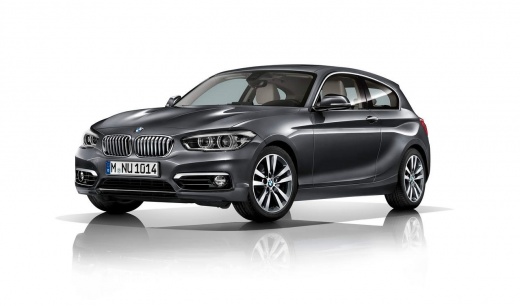
How to Make the Boot Automatic on BMW 1 Series
Model: BMW Serie 1
F21, MK 2, F20
- Years:
2011, 2012, 2013, 2014, 2015, 2016, 2017, 2018, 2019
Video tutorial
Watch this friendly YouTuber who made the boot of his BMW 1 Series automatic by simply installing automatic struts purchased from emeraldstruts.com, costing around £92. He found the ones suitable for his vehicle. Installing them is very simple. Just remove the existing strut, which is a clip-in type, and fit the new ones that are also clip-in. Additionally, they have tiny safety hooks to insert into the clips. Once done, the tailgate will open automatically, both with the button and the remote, which is very convenient, especially when you have your hands full while shopping.
Updated on 2 July 2026 by ScegliAuto
Related tutorials
BMW Serie 1
(2004-2013 /
E81, E82, MK 1, E87)
Today’s steps will show you how to disassemble and replace the rear wiper motor on a BMW 1 Series. First, open the rear hatch of the boot and start b…
BMW Serie 1
(2011-2019 /
F21, MK 2, F20)
This guide shows how to replace the rear wiper motor on a BMW 1 Series. Unscrew the fastening nut of the wiper arm; remove it from the tailgate. Lift…
BMW Serie 1
(2011-2019 /
F21, MK 2, F20)
In the BMW 1 Series, it can happen that the boot lid gets stuck, for example, due to a problem with the control button or the lock actuator. In these…
Other guides you may be interested in |
How to Reset the AdBlue Warning Light on a Peugeot Boxer
To reset the AdBlue system on a 2018 Peugeot Boxer, follow these steps: Start the engine and ensure the vehicle is parked in a well-ventilated area. Locate the "MENU" button on the dashboard or steering wheel controls. Press and hold the "MENU" button until the menu options appear on the display. Use the arrow buttons or scroll wheel to access the "Vehicle Settings" or "Settings" menu. Select the "AdBlue" or "AdBlue System" option. Look for the "Recharge" or "Reset" option in the AdBlue menu. Once you find the reset option, select it and confirm your choice when prompted. The system will be reset, and a confirmation message may appear on the display. Turn off the engine and wait a few seconds. Restart the engine and check that the AdBlue system has been reset. by ScegliAuto More videos
|
|
For advertising on this site Write to info@scegliauto.com
ScegliAuto is not responsible for any inaccuracy of the data in the lists. To report any inaccuracy or your business (if you own the business in question), please write to info@scegliauto.com
Number of seconds to generate the page: 0.012
(c) ScegliAuto 2026 - info@scegliauto.com - Privacy policy VAT number: IT01247470535 |
