
|
Do it yourself
| |||
| ||||


How do you reset the Service light of the Dacia Duster?
Model: Dacia Duster
HM, MK 2
- Years 2017-2024
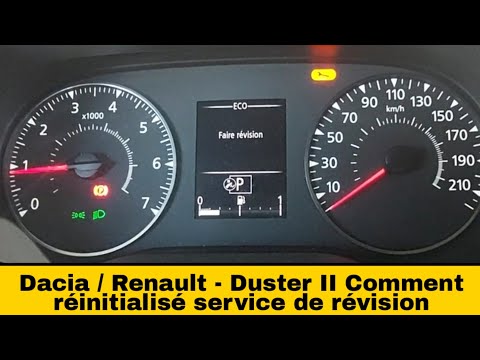
It will be possible to completely remove the Dacia Duster Service by inserting the ignition key and turning it to turn on the instrument panel, checking the ignition of the warning light with the English key. To make it disappear, you will need to scroll through the menu using the directional controls located on the right side of the steering wheel. Moving through the menu, you will need to stop at the item regarding maintenance intervals and the kilometers remaining until the next service. By holding down the button with the up arrow, the wording on the display will start flashing, until it stabilizes and allows the warning light to reset.
Posted on 28 March 2025 by ScegliAuto
Video tutorial
Related tutorials
Dacia Duster
(2017-2024 /
HM, MK 2)
The Service light coming on in the Dacia Duster and in any vehicle, indicates that the service is due soon, in other words, the oil and engine filter…
Dacia Duster
(2017-2024 /
HM, MK 2)
To reset the Service light on the Dacia Duster, insert the key and turn it to activate the instrument cluster, noting the illumination of the spanner…

Dacia Duster
(2017-2024 /
HM, MK 2)
It is now time to service your 2019 Dacia Duster, after having traveled a certain number of kilometers or a certain amount of time, both parameters e…
Other guides you may be interested in
|
Frequently Asked QuestionsHow to Open a Stuck Boot on the Peugeot 407?
On the Peugeot 407, the boot may become stuck, possibly due to a problem with the control button or the lock actuator. In such cases, you can perform an emergency opening by following the simple procedure shown in this tutorial. First, open the rear doors, then lower the seat back by operating the release lever. Next, go inside the boot, locate the lock, and manually operate it using a flathead screwdriver. The boot will then be free to open. by ScegliAuto More videos
|
|
For advertising on this site Write to info@scegliauto.com
ScegliAuto is not responsible for any inaccuracy of the data in the lists. To report any inaccuracy or your business (if you own the business in question), please write to info@scegliauto.com
Number of seconds to generate the page: 0.114
(c) ScegliAuto 2026 - info@scegliauto.com - Privacy policy VAT number: IT01247470535 |
