
|
Do it yourself
| |||
| ||||


How to Reset the Dacia Duster
Model: Dacia Duster
HM, MK 2
- Years 2017-2024
In this video, you will learn how to reset the Dacia Duster. Get in the car and press the Start button to turn on the instrument cluster. Do not start the engine; this operation must be performed with the engine off. Now, by pressing the two arrows on the left side of the steering wheel, look for the issue indicated by the car's maintenance service. You can follow the sequence of functions on the display in the centre of the instrument cluster. Once you reach the relevant option, press and hold the down arrow button for a few seconds until you see the message flash. Now wait for the reset process to complete.
Updated on 28 June 2026 by ScegliAuto
Video tutorial
Related tutorials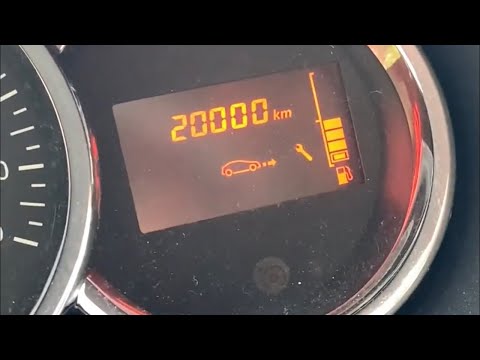
Dacia Duster
(2010-2017 /
HS, MK 1)
Before you can start, sit in the driver's seat of your Dacia Duster. Begin by activating the instrument cluster by simply turning the key in the igni…

Dacia Duster
(2010-2017 /
HS, MK 1)
The video focuses on cleaning the upholstery of the rear seats in a Dacia Duster but also shows how to unclip them. It's quite simple: in the Dacia D…

Dacia Duster
(2010-2017 /
HS, MK 1)
On the Dacia Duster, the maintenance interval reset is performed with the engine off. With the Dacia Duster stationary, turn the ignition to ON witho…
Other guides you may be interested in
|
Frequently Asked QuestionsWhere is the Spare Wheel in the Peugeot 5008?
This video shows where the spare wheel is located in the Peugeot 5008 and how to access it, useful in case of a puncture. As shown, the wheel is not in the usual boot compartment but underneath it, outside the vehicle. To free the wheel, first gather the tools provided, then open the boot, locate the small indicated hatch, and open it. Next, loosen the bolt just released using the large socket wrench enough to lower the wheel to the ground. by ScegliAuto More videos
|
|
For advertising on this site Write to info@scegliauto.com
ScegliAuto is not responsible for any inaccuracy of the data in the lists. To report any inaccuracy or your business (if you own the business in question), please write to info@scegliauto.com
Number of seconds to generate the page: 0.593
(c) ScegliAuto 2026 - info@scegliauto.com - Privacy policy VAT number: IT01247470535 |
