
|
Do it yourself
| |||
| ||||



How to configure the radio of the DFSK 500
Model: DFSK 500
MK 1
- Years:
2022, 2023, 2024, 2025, 2026
Video tutorial
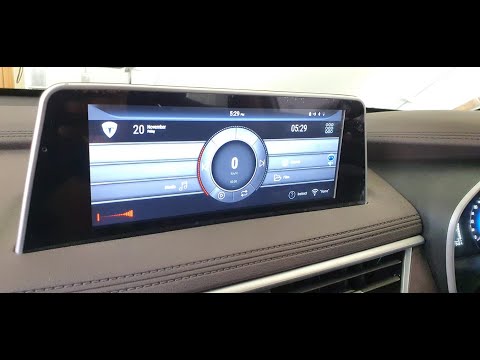
Configuring the radio of the DFSK 500 is a very simple operation that can be done independently, thanks to our video tutorial that will explain how to do it easily. As shown in the video, the DFSK 500 features a display from which you can access two screens; the first is just a facade as it does not allow any action, while the second contains the settings, the car cabling, Bluetooth, and the radio. Within the settings, you can perform radio configuration actions to set it up as you prefer. The settings menu includes various functions such as the equaliser function that allows you to configure the sounds, the volume function that lets you adjust the volume of the various players, and the clock function that allows you to change the time and date. From the main menu, you can access the menu to connect your phone to the car. Simply turn on the Bluetooth on your phone and add your device; the car will do the rest. If you do not want to use Bluetooth, you can use the CarAuto app, which allows you to connect your phone to the car using a USB cable.
Updated on 13 September 2026 by ScegliAuto
Related tutorials
DFSK 500
(2022-2026 /
MK 1)
To replace the speakers on a DFSK 500, you need to loosen the screws securing the door panel corresponding to your housing: once the screws at the bo…

DFSK 500
(2022-2026 /
MK 1)
In this video, see how to adjust the handbrake of the DFKS 580 Glory: get inside and pull it to its maximum; you will need to remove the rear panel o…
DFSK 500
(2022-2026 /
MK 1)
In this video, we will see how to install the Android app on a DFKS. This is a Chinese manufacturer specialising in the production of light trucks, w…
Other guides you may be interested in
|
How to Reset the AdBlue Warning Light on a Peugeot Boxer
To reset the AdBlue system on a 2018 Peugeot Boxer, follow these steps: Start the engine and ensure the vehicle is parked in a well-ventilated area. Locate the "MENU" button on the dashboard or steering wheel controls. Press and hold the "MENU" button until the menu options appear on the display. Use the arrow buttons or scroll wheel to access the "Vehicle Settings" or "Settings" menu. Select the "AdBlue" or "AdBlue System" option. Look for the "Recharge" or "Reset" option in the AdBlue menu. Once you find the reset option, select it and confirm your choice when prompted. The system will be reset, and a confirmation message may appear on the display. Turn off the engine and wait a few seconds. Restart the engine and check that the AdBlue system has been reset. by ScegliAuto More videos
|
|
For advertising on this site Write to info@scegliauto.com
ScegliAuto is not responsible for any inaccuracy of the data in the lists. To report any inaccuracy or your business (if you own the business in question), please write to info@scegliauto.com
Number of seconds to generate the page: 0.045
(c) ScegliAuto 2026 - info@scegliauto.com - Privacy policy VAT number: IT01247470535 |
