
|
Do it yourself
| |||
| ||||


How to Update the Key for Ford Focus and Mondeo
Model: Ford Focus
MK 2, Focus 2
- Years:
2004, 2005, 2006, 2007, 2008, 2009, 2010, 2011
Video tutorial
Let's see how to update the key/remote for a Ford Focus or Mondeo: you will need the old remote and the update kit, which can be found on Amazon with the code B091FHJGQH for £16.38 with free delivery for Prime customers. This is a simple procedure, but it must be done with care. In the front half of the old remote, you will find a small black cylinder, which is the immobiliser chip. Carefully remove it; take out the physical key by unscrewing the two screws from the key body; remove the electronic board from the other half of the remote and take out the CR2032 battery from its housing. Open the update kit, insert the electronic board, the battery - ensuring correct polarity - secure the physical key with its screws, and then attach the immobiliser chip with double-sided tape in the same spot from where it was removed in the old remote. Join the two halves of the casing, screw the two screws on the back, and test the buttons.
Posted on 5 May 2026 by ScegliAuto
Related tutorials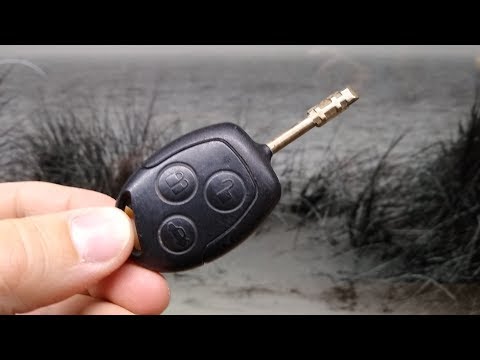
Ford Focus
(1998-2004 /
MK 1)
In this video, you will see how to replace the battery in the remote key of a Ford Focus, as well as in the Mondeo and other models from the manufact…

Ford Focus
(2011-2018 /
MK 3)
Today we will explain how to reset the service light on Ford Kuga, Ford Mondeo, Ford Fiesta, and Ford Focus vehicles. Specifically, today we will see…

Ford Focus
(2011-2018 /
MK 3)
Today we will see how to reset the service light related to the audio service and engine oil change on a 2013 Ford Focus vehicle. This operation can …
Other guides you may be interested in
|
How to Reset the Tire Pressure Light on a MG ZS?
On the instrument cluster of the MG ZS, the tire pressure light that appears can be reset by inflating the tires to the correct pressure: this value will be indicated on the sticker attached to the driver's door pillar. Once the tires have been properly inflated, you can turn on the instrument cluster and navigate through the menu until you find the option that indicates tire pressure: if this screen shows the new values, the light will turn off; otherwise, you will need to drive for a few miles so that the sensors can read the new values and turn off the light afterward. by ScegliAuto More videos
|
|
For advertising on this site Write to info@scegliauto.com
ScegliAuto is not responsible for any inaccuracy of the data in the lists. To report any inaccuracy or your business (if you own the business in question), please write to info@scegliauto.com
Number of seconds to generate the page: 0.123
(c) ScegliAuto 2026 - info@scegliauto.com - Privacy policy VAT number: IT01247470535 |
