
|
Do it yourself
| |||
| ||||


Guide to Installing Brake Pads
Model: Ford Fiesta
MK V, MK 5, Fiesta 5
- Years:
2002, 2003, 2004, 2005, 2006, 2007, 2008
Video tutorial
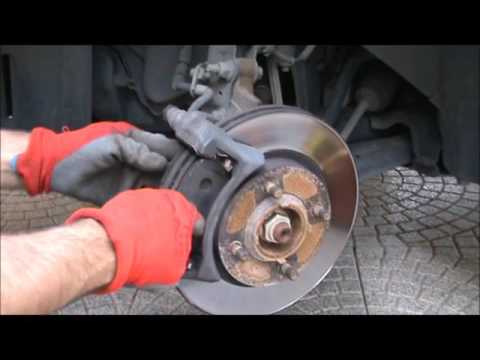
The following guide shows a simple method for replacing your car's brake pads, requiring a bit of patience and time, without needing to take the car to a mechanic. First, remove the car wheel and lift the vehicle with the jack. You can then begin to disassemble the pads by removing the retaining clip. Use an Allen key to unscrew the two bolts, working between the caliper and disc to leverage the caliper for easy removal. The pads have a specific orientation for fitting. Once the pads are in place and the caliper is positioned in its housing, reattach the hex bolts.
Updated on 12 February 2026 by ScegliAuto
Related tutorials
Ford Fiesta
(2002-2008 /
MK V, MK 5, Fiesta 5)
To replace the brake pads, start by lifting the vehicle and removing the front wheel; then detach the side spring applied to the caliper and remove t…
Ford Fiesta
(2008-2017 /
Fiesta 6, MK VI, MK 6)
Today, I will show you how to replace the brake pads on your Ford Fiesta. First, lift the car and remove the wheel. Next, unscrew the front bolts to …

Ford Fiesta
(2008-2017 /
Fiesta 6, MK VI, MK 6)
Today we will explain how to replace the front brake pads on a Ford Fiesta model 6 vehicle. To perform the replacement of the pads, it is necessary t…
Other guides you may be interested in
|
How to Activate the Automatic Folding and Unfolding of the Wing Mirrors on the Jeep Compass
Follow these brief instructions to activate the automatic folding and unfolding of the external wing mirrors on the Jeep Compass. First, get inside the vehicle and turn on the ignition; then press the button located beneath the mirror glass adjustment to electrically open the mirror, as shown in the video. Pressing the button in the opposite direction will close the mirrors; by holding the button, the mirrors will open and close automatically! by ScegliAuto More videos
|
|
For advertising on this site Write to info@scegliauto.com
ScegliAuto is not responsible for any inaccuracy of the data in the lists. To report any inaccuracy or your business (if you own the business in question), please write to info@scegliauto.com
Number of seconds to generate the page: 0.117
(c) ScegliAuto 2026 - info@scegliauto.com - Privacy policy VAT number: IT01247470535 |
