
|
Do it yourself
| |||
| ||||



Installation of Adapter Kit to Control iPhone via Stereo
Model: Lexus GS
S190
- Years:
2005, 2006, 2007, 2008, 2009, 2010, 2011
Video tutorial
If you want to control your iPhone through the stereo, you can do so by installing one of these kits. First, use a hook tool to remove the panel below the stereo. Then, unscrew the gear knob, placing the lever in "N" (neutral) to create more working space. Now, manually detach the entire dashboard above the tunnel and any associated connectors. Unscrew the four screws from the side panels and manually unclip them from the retaining clips. You can now unscrew the four screws on the side of the central console. Extract the stereo unit and disconnect the stereo connector as shown in the video. Take the kit and connect one of the connectors to the stereo in place of the original, while the other connects to the connector you detached from the stereo. Temporarily reposition the stereo and connect your iPhone to check its functionality. As shown in the images, pressing the "Disc" button once displays "CD1", activating the CD changer. Pressing "Disc" a second time shows "CD2", allowing you to interact with your iPhone in various modes depending on the selected buttons (1-2-3-4-5-6). Now, simply position the adapter as shown in the video, making a small groove for the connection cables to exit from the glove compartment, and reassemble everything as it was originally. Car model: LEXUS GS Year: 2006 Required tools: cross screwdriver, hook tools, 10mm socket wrench with extension.
Updated on 10 February 2026 by ScegliAuto
Related tutorials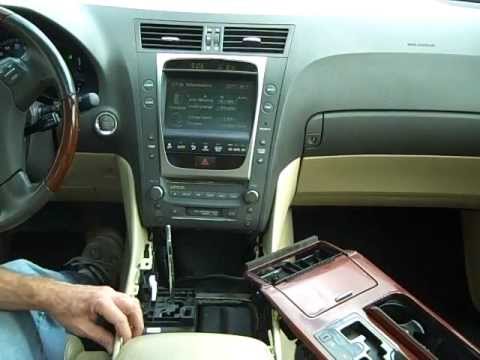
Lexus GS
(2005-2011 /
S190)
Removing the original car radio requires the removal of some trim elements from the centre console: start by unscrewing the gear lever knob after pos…

Lexus GS
(2005-2011 /
S190)
In this video, you will see where the fuse boxes are located in the Lexus GS 450h and their respective layouts, which you can consult if you need to …

Lexus GS
(2005-2011 /
S190)
In this video, you can see the fuse diagrams for the Lexus GS 350 and where the boxes are located, useful if you need to check the fuses of a malfunc…
Other guides you may be interested in
|
How to Open the Fuel Filler Flap in the Hyundai i30?
In this tutorial, you will learn how to open the fuel filler flap in the Hyundai i30, a very simple operation that follows the typical procedure of most vehicles. First, unlock the locks using the designated button on the remote, then open the driver's door, locate the release lever on the left side of the seat, and operate it. Next, move to the fuel filler flap, open it completely, unscrew the cap, and refuel as needed. To close the flap, simply press it gently. by ScegliAuto More videos
|
|
For advertising on this site Write to info@scegliauto.com
ScegliAuto is not responsible for any inaccuracy of the data in the lists. To report any inaccuracy or your business (if you own the business in question), please write to info@scegliauto.com
Number of seconds to generate the page: 0.074
(c) ScegliAuto 2026 - info@scegliauto.com - Privacy policy VAT number: IT01247470535 |
