
|
Do it yourself
| |||
| ||||


Maxus T60 - Video guides Maxus T60 (2016-2024 / MK 1) How to Reset the Service Light on a Maxus T60 To reset the service light on a Maxus T60, the procedure is simple. With the ignition on (key in the on position, without starting the engine), use the button …Read all… Posted on 5 October 2026 by ScegliAuto  Maxus T60 (2016-2024 / MK 1) How to Reset the Service Light on an LDV T60 Maxus and LDV are two sides of the same coin: LDV (Leyland DAF Vans) was a British brand of commercial vehicles. In 2009, the Chinese group SAIC Motor (which …Read all… Posted on 19 July 2026 by ScegliAuto  Maxus T60 (2016-2024 / MK 1) How to Reset the Service Light on the 2024 Maxus T60 Let's see how to reset the service light on the 2024 Maxus T60: turn on the instrument cluster and use the button on the windshield wiper control (located on …Read all… Posted on 15 April 2026 by ScegliAuto  Maxus T60 (2016-2024 / MK 1) How to access the spare wheel of the Maxus T60 In this video, we can see how to access the spare wheel of the Maxus T60: we need to open the right rear door of the vehicle. In the back seat, we find a …Read all… Posted on 26 January 2026 by ScegliAuto  Maxus T60 (2016-2024 / MK 1) How to reset the service light on the Maxus T60. Today we will see together how to reset the service reminder light on a 2020 Maxus T60 vehicle by ourselves. After starting the instrument panel, press the BC …Read all… Posted on 28 December 2025 by ScegliAuto  Maxus T60 (2016-2024 / MK 1) Removal of the alternator belt on a Maxus T60 In this video we see how to change the alternator belt and the alternator itself on a Maxus T60: first, we need to remove the belt from the tensioner pulleys, …Read all… Posted on 9 October 2025 by ScegliAuto  Maxus T60 (2016-2024 / MK 1) To reset the service on Maxus T60, follow these steps: In this video we can see how to reset the service light on a Maxus T60: on the sides of the steering wheel we have the light and turn signal levers: on the …Read all… Posted on 29 August 2025 by ScegliAuto  Maxus T60 (2016-2024 / MK 1) How to change the time on a Maxus T60 pick-up truck In this video, we will see how to change the time on the instrument panel of a Maxus T60, to switch to daylight saving time or to adjust the time in case we …Read all… Posted on 7 June 2025 by ScegliAuto  Maxus T60 (2016-2024 / MK 1) How do you adjust the time in the Maxus T60? From the vehicle mentioned above, we have a video presentation posted here, which details the various aesthetic and technical features. Paying attention, at a …Read all… Posted on 19 May 2025 by ScegliAuto  Maxus T60 (2016-2024 / MK 1) How to reset the AdBlue warning light on the Maxus T60 pick-up? If the AdBlue light has turned on in the instrument panel of our Maxus T60 pick-up truck, it means that the liquid of the anti-pollution system has reached the …Read all… Posted on 14 April 2025 by ScegliAuto  Maxus T60 (2016-2024 / MK 1) How to Change the Cabin Air Filter on a Maxus T60 In this video, see how to change the cabin air filter on a Maxus T60: it is located behind the glove compartment, which you can remove by simply pulling out …Read all… Posted on 2 November 2026 by ScegliAuto  Maxus T60 (2016-2024 / MK 1) How to Remove the Radio from a Maxus T60 Removing the radio from the Maxus T60 is very simple. This operation will take only a few minutes and can be done independently by following our steps. The …Read all… Posted on 23 October 2026 by ScegliAuto  Maxus T60 (2016-2024 / MK 1) How to Reset the Service Light on Maxus T60 Pickup In this video, see how to reset the service light on the Maxus T60 pickup. This vehicle is marketed in Australia and New Zealand under the LDV T60 brand. The …Read all… Posted on 14 October 2026 by ScegliAuto  Maxus T60 (2016-2024 / MK 1) How to Reset the Service Light on the Maxus T60? To reset the Service light on the Maxus T60, turn on the ignition by inserting the key into the ignition switch and turning it clockwise. Once the dashboard is …Read all… Posted on 10 October 2026 by ScegliAuto  Maxus T60 (2016-2024 / MK 1) How to Reset the Service Light on the Maxus T60 Pickup? Resetting the service light on the Maxus T60 pickup, as shown in this tutorial, is an extremely simple and quick operation. Before proceeding, ensure you have …Read all… Posted on 20 August 2026 by ScegliAuto 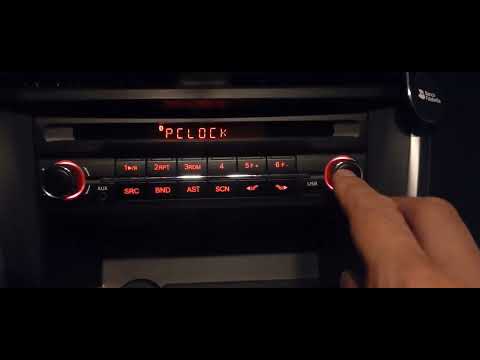 Maxus T60 (2016-2024 / MK 1) How to Set the Time on a Maxus T60 Radio Setting the time on a Maxus T60 radio is a very simple operation that you can do completely on your own, thanks to our short video tutorial. The first step is …Read all… Posted on 20 August 2026 by ScegliAuto  Maxus T60 (2016-2024 / MK 1) How to Install the Bed Covers on the Maxus T60 Below are the instructions to install the side plastic covers that protect the rear bed of the Maxus T60 in simple and quick steps. First, move to the back of …Read all… Posted on 16 August 2026 by ScegliAuto  Maxus T60 (2016-2024 / MK 1) How to Reset the Service Light on the Maxus T60 To reset the service light on the Maxus T60, start by turning on the vehicle's ignition and starting the engine. Then, operate from the central infotainment …Read all… Posted on 14 August 2026 by ScegliAuto
Maxus T60 (2016-2024 / MK 1)How to Install the Front Tow Hitch on a Maxus T60 Here are the steps to install the front tow hitch on a Maxus T60, as well as on an LDV T60. First, move to the front and remove the plastic cover under the …Read all… Posted on 6 August 2026 by ScegliAuto  Maxus T60 (2016-2024 / MK 1) Guide to Replacing the Timing Belt on the MG T60 - Maxus T60 In this guide, we will look at the procedure to remove and replace the timing belt on the Maxus T60 and MG T60. First, open the hood of your car and start …Read all… Posted on 4 November 2026 by ScegliAuto
Car stereo (4)
Key (1)
Trunk lock (1)
Timing belt (1)
V-belt (2)
Checks and maintenance (1)
Dashboard (1)
Headlight (2)
Air filter (1)
Cabin air filter (2)
Fuel filter (2)
Transmission fluid (1)
Engine oil (1)
Clock (2)
Door trim panel (2)
Instrument cluster (1)
Wheel (2)
AdBlue warning light (1)
Warning light – error code (3)
Service warning light (15)
|
See also:How to Set the Time in an Audi A4?
In this tutorial, you will see how to set the time in an Audi A4, a very simple and quick operation to perform after replacing the battery or when the time changes. First, insert the key and turn on the instrument cluster. Then, press the "SETUP" button located on the center console. Next, press the upper left arrow button, navigate to the "Time" option, and use the central knob to adjust the clock. Finally, set any necessary formats and save by returning to the main screen. by ScegliAuto More videos
|
|
For advertising on this site Write to info@scegliauto.com
ScegliAuto is not responsible for any inaccuracy of the data in the lists. To report any inaccuracy or your business (if you own the business in question), please write to info@scegliauto.com
Number of seconds to generate the page: 0.060
(c) ScegliAuto 2026 - info@scegliauto.com - Privacy policy VAT number: IT01247470535 |
