Do it yourself
Frequently asked questions about cars and motorcycles
  1. Car
  2. :
  3. Mercedes
  4. :
  5. Classe E
  6. : Rear bench seat

Mercedes Classe E - Rear bench seat

Rear Bench Seat Mercedes Classe E (2009-2016 / w 212)

Mercedes Classe E (2009-2016 / W212)
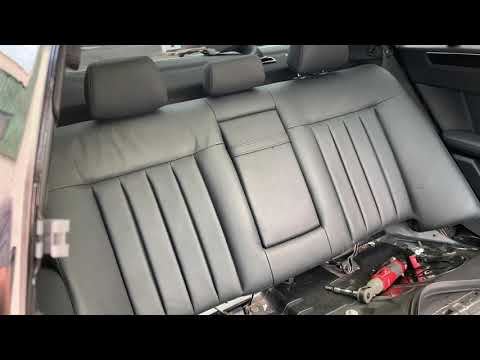
How to remove the rear seat of a Mercedes E-Class W212

From this video, we can understand how to remove the rear seat of a Mercedes car that has a child seat installed: the seat belt of this seat was stuck, and …Read all…
Posted on 24 February 2025 by ScegliAuto
Mercedes Classe E (2009-2016 / W212)
How to Remove the Rear Seat Bench on a Mercedes E-Class W212

Removing the rear seat bench of a Mercedes E-Class W212 is simple: pulling the seat cushion is easy, just slide it out. To remove the backrest, go to the …Read all…
Posted on 6 October 2026 by ScegliAuto

Cigarette lighter (1) Airbag (7) Alternator (4) Speaker (11) Shocks (7) Antenna (1) Air conditioning (2) Car stereo (18) Anti-roll bar (1) Battery (43) Air vents (4) Control arm (3) Transmission (15) Spark plugs (3) Glow plugs (7) Convertible top (1) Body (16) Glove compartment (2) Control unit (7) Key (42) Trunk lock (1) Timing belt (10) V-belt (2) Air conditioner (17) A/C controls (8) Onboard computer (18) Checks and maintenance (78) Dashboard (17) Bearing (1) Brake rotors (2) Rear bench seat (2) Electric cooling fan (1) Side marker light (2) Headlight (18) Tail light (8) Fog lights (1) Air filter (12) Cabin air filter (19) Fuel filter (2) Diesel fuel filter (4) Oil filter (4) Parking brake (4) Grille (2) Fuel injectors (2) Window switch (3) Accessory kit (3) Xenon headlight kit (1) Light bulb (2) Side marker bulb (4) Headlight bulb (25) Tail light bulb (3) Interior dome light bulb (9) Antifreeze coolant (2) Instrument panel light (4) License plate light (2) Rear window (1) Handle (6) Exhaust muffler (1) Engine (9) Power window motor (4) Starter motor (4) Transmission fluid (5) Brake fluid (1) Engine oil (8) Power steering fluid (2) Clock (62) Door trim panel (28) Windshield (1) Front bumper (4) Rear bumper (2) Brake pads (1) Tires (2) Shift knob (5) Pump (9) Fuel pump (9) Car door (1) Push button (2) Power window switch (3) Instrument cluster (12) Radiator (5) Wheel (1) Fuse box (124) Seat (24) Crankshaft position sensor (5) Engine coolant temperature sensor (3) Parking sensors (3) Door lock (7) Brake system (1) Oxygen sensor (1) Suspension system (3) Side mirror (39) Rearview mirror (7) AdBlue warning light (19) Warning light – error code (76) (31) Tire pressure warning light (14) Service warning light (174) Manufacturer emblem (2) Engine mount (3) Brake drums and shoes (1) Fuel cap (5) Windshield wipers (4) Thermostat (2) Drivetrain (5) Center console tunnel (5) Turbocharger (1) Valve (2) EGR valve (10) Blower motor (6) Side window (3) Steering wheel (1)

How to Set the Time and Date on a Citroen C3 Picasso

Setting the time and date on a Citroen C3 Picasso is very straightforward. First, turn on the vehicle and press the Menu button on the radio to access the car settings. Press the arrow button to scroll through the menu and select the "TIME" option. Set the hours and press the OK button. Next, adjust the minutes. Once completed, proceed to set the date. Select the "DATE" option and use the same buttons to set the date. Finally, switch off the instrument panel and restart it to verify the new time and date settings.

Watch the video!


by ScegliAuto

More videos