
|
Do it yourself
| |||
| ||||



How to restore the tire pressure warning on a Mini Countryman
Model: Mini Mini
F60, Countryman2
- Years:
2017, 2018, 2019, 2020, 2021, 2022, 2023
Video tutorial
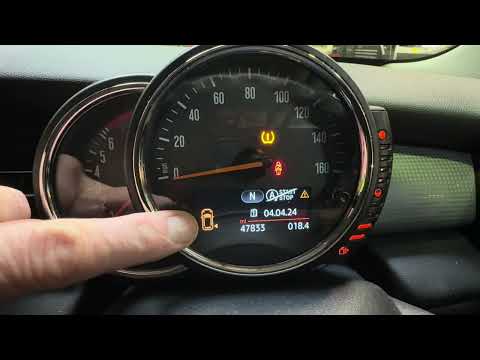
Let's see how to reset the tire pressure warning on a Mini Countryman as shown in the video: if the warning light is on but the tires are intact, check the pressures using a pressure gauge to verify that all tires are inflated to the recommended values. Turn on the ignition, go to iDrive/menu/vehicle/vehicle status/tire pressure. Select "reset", start the car and drive it for a few minutes, during which the system will learn the new pressures. TPMS sensors have an internal battery that lasts between 5 and 10 years; if we have inflated the tires or replaced them, the reset is necessary to turn off the warning light. If it remains on after the reset, then we must check for any damage to the wheels or sensors.
Posted on 7 September 2025 by ScegliAuto
Related tutorials
Mini
(2010-2016 /
Countryman1, R60)
The activation of the TPMS light indicates a possible puncture or pressure loss from one or more tires; in this guide we will see how to reset the ti…

Mini
(2017-2023 /
F60, Countryman2)
Following this brief procedure, we will see how to reset the tire pressure warning light on the Mini Countryman; before performing the reset, it is n…
Mini
(2010-2016 /
Countryman1, R60)
If the orange tyre warning light on your 2015 Mini Countryman remains illuminated, it means the control unit has detected abnormal pressure in the in…
Other guides you may be interested in
|
How to Open the Fuel Flap and Cap on an MG HS
This guide will show you how to open the fuel flap and cap on an MG HS in simple steps. To open the fuel flap, ensure the vehicle is unlocked; then press on the edge of the flap to open it, as shown in the video. Next, unscrew the fuel cap counterclockwise to refuel at the pump; once finished, screw the cap back on until it clicks, and finally close the fuel flap! by ScegliAuto More videos
|
|
For advertising on this site Write to info@scegliauto.com
ScegliAuto is not responsible for any inaccuracy of the data in the lists. To report any inaccuracy or your business (if you own the business in question), please write to info@scegliauto.com
Number of seconds to generate the page: 0.110
(c) ScegliAuto 2026 - info@scegliauto.com - Privacy policy VAT number: IT01247470535 |
