
|
Do it yourself
| |||
| ||||


How to set the language on the Nissan Juke
Model: Nissan Juke
MK 1
- Years 2010-2019
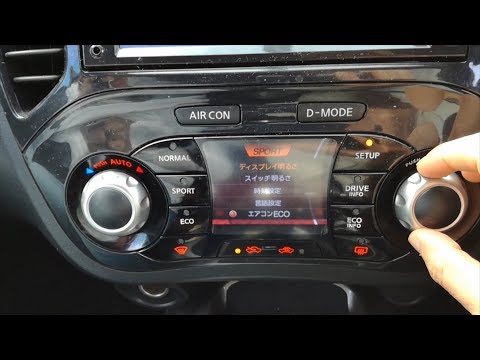
These short and simple steps will show us how to change the language on the multimedia system of the Nissan Juke. First of all, we get into the car and start the dashboard; then we go to the system settings on the central display and then to the language option, as shown in the video. At this point, we choose the preferred language, waiting a few seconds for it to be set; we exit the settings menu to save the changes made, turning off the dashboard and starting the engine.
Posted on 5 July 2025 by ScegliAuto
Video tutorial
Related tutorials
Nissan Juke
(2019-2026 /
MK 2)
Today we will explain how to set the language of the onboard computer and instrument cluster of the 2019 Nissan Juke independently and without extern…
Nissan Juke
(2010-2019 /
MK 1)
Today we will see, in this video tutorial, how to change the language of the commands of the central instrumentation of the Nissan Juke. First of all…

Nissan Juke
(2019-2026 /
MK 2)
To change the language on the onboard computer of your Nissan Juke, you can follow these general steps. Turn on the instrument panel. Use the switche…
Other guides you may be interested in
|
How to Replace the Cabin Filter in a Peugeot 207
How do you replace the cabin filter (pollen filter) located in a Peugeot 207? Follow these steps to remove the filter from its dedicated housing: use a screwdriver to unscrew the screws of the plastic cover located under the front windscreen, then remove the filter cover using a lever (where the air filter is located). Use a screwdriver to remove the cap from the filter housing and extract the cabin filter. Insert a new filter ensuring it fits snugly around the walls of the box. Finally, reattach the filter box cap and tighten the screws. Close the engine bonnet after assembly. by ScegliAuto More videos
|
|
For advertising on this site Write to info@scegliauto.com
ScegliAuto is not responsible for any inaccuracy of the data in the lists. To report any inaccuracy or your business (if you own the business in question), please write to info@scegliauto.com
Number of seconds to generate the page: 0.061
(c) ScegliAuto 2026 - info@scegliauto.com - Privacy policy VAT number: IT01247470535 |
