
|
Do it yourself
| |||
| ||||


Vauxhall Insigna - ClockClock Vauxhall Insigna (2017-2026 / mk 2, insigna b) Vauxhall Insigna (2017-2026 / MK 2, Insignab)
How to Set the Time in the Opel Insignia In this tutorial, you will see how to set the time in the Opel Insignia, a very simple and quick operation to perform, for example, after disconnecting the …Read all… Posted on 7 May 2026 by ScegliAuto  Vauxhall Insigna (2008-2017 / Insignaa, MK 1)
How do you set/change the date and time on an Opel Insignia A? To set or change the date and time in your Opel Insignia A, start by turning on the engine or putting the car in "accessory" position (key on ON). Then, on the …Read all… Posted on 1 October 2025 by ScegliAuto  Vauxhall Insigna (2008-2017 / Insignaa, MK 1)
How to adjust the time in the Opel Insignia? In this tutorial we can see how to adjust the time in the Opel Insignia, an extremely simple and fast operation, to be carried out for example after replacing …Read all… Posted on 2 August 2025 by ScegliAuto  Vauxhall Insigna (2008-2017 / Insignaa, MK 1)
How to set the time on the Opel Insignia? In this tutorial we can see how to adjust the time in the Opel Insignia, an extremely simple and quick operation, to be carried out for example after …Read all… Posted on 20 January 2025 by ScegliAuto 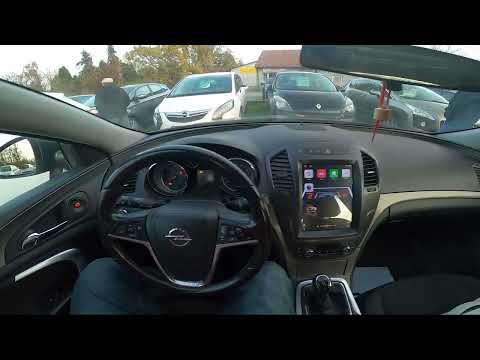 Vauxhall Insigna (2008-2017 / Insignaa, MK 1)
How to set the clock on the Opel Insignia? To change the language on the Opel Insignia, switch on the instrument panel and navigate through the menu that appears on the central display of the dashboard. …Read all… Posted on 19 September 2026 by ScegliAuto Clock Vauxhall Insigna (2008-2017 / insigna a, mk 1)
Vauxhall Insigna (2017-2026 / MK 2, Insignab)How to Set the Time in the Opel Insignia In this tutorial, you will see how to set the time in the Opel Insignia, a very simple and quick operation to perform, for example, after disconnecting the …Read all… Posted on 7 May 2026 by ScegliAuto
Vauxhall Insigna (2008-2017 / Insignaa, MK 1)How do you set/change the date and time on an Opel Insignia A? To set or change the date and time in your Opel Insignia A, start by turning on the engine or putting the car in "accessory" position (key on ON). Then, on the …Read all… Posted on 1 October 2025 by ScegliAuto
Vauxhall Insigna (2008-2017 / Insignaa, MK 1)How to adjust the time in the Opel Insignia? In this tutorial we can see how to adjust the time in the Opel Insignia, an extremely simple and fast operation, to be carried out for example after replacing …Read all… Posted on 2 August 2025 by ScegliAuto
Vauxhall Insigna (2008-2017 / Insignaa, MK 1)How to set the time on the Opel Insignia? In this tutorial we can see how to adjust the time in the Opel Insignia, an extremely simple and quick operation, to be carried out for example after …Read all… Posted on 20 January 2025 by ScegliAuto
Vauxhall Insigna (2008-2017 / Insignaa, MK 1)How to set the clock on the Opel Insignia? To change the language on the Opel Insignia, switch on the instrument panel and navigate through the menu that appears on the central display of the dashboard. …Read all… Posted on 19 September 2026 by ScegliAuto Airbag (7) Antenna (1) Car stereo (7) Battery (5) Grille (1) Transmission (2) Spark plugs (1) Glow plugs (1) Body (1) Control unit (1) Key (21) Timing belt (12) Onboard computer (5) Checks and maintenance (13) Dashboard (2) Shifter boot (1) Brake rotors (1) Headlight (8) Tail light (4) Fog lights (1) Air filter (4) Cabin air filter (11) Diesel fuel filter (5) Oil filter (1) Light bulb (3) Side marker bulb (1) Headlight bulb (15) Tail light bulb (2) Handle (1) Transmission fluid (1) Engine oil (3) Clock (5) Door trim panel (12) Front bumper (4) Rear bumper (1) Brake pads (4) Tires (2) Shift knob (8) Pump (1) Fuel pump (2) Car door (1) Push button (1) Instrument cluster (3) Radiator (1) Fuse box (30) Seat (3) Door lock (3) Side mirror (3) AdBlue warning light (5) Warning light – error code (23) (7) Tire pressure warning light (5) Service warning light (107) Fuel cap (1) Cylinder head (1) Turbocharger (2) Windshield washer nozzle (1) EGR valve (3) Steering wheel (1) |
How to Replace the External Wing Mirror on a Ford C MAX
In the event of a breakage, it will be necessary to replace the external wing mirror on the 2011 Ford C MAX. This operation is easily performed independently. Start by removing the internal cover of the mirror with a plastic lever. Then, use a socket wrench to remove the securing pins. Once the pins are removed, you can take off the mirror, but not before disconnecting the power connectors. Then proceed to fit the new mirror. First, connect the connectors and then secure the mirror to its housing with the pins. Refit the plastic cover and test the operation of the electric mirror using the controls. by ScegliAuto More videos
|
|
For advertising on this site Write to info@scegliauto.com
ScegliAuto is not responsible for any inaccuracy of the data in the lists. To report any inaccuracy or your business (if you own the business in question), please write to info@scegliauto.com
Number of seconds to generate the page: 0.014
(c) ScegliAuto 2026 - info@scegliauto.com - Privacy policy VAT number: IT01247470535 |
