
|
Do it yourself
| |||
| ||||


Vauxhall Mokka - Instrument clusterInstrument Cluster Vauxhall Mokka (2020-2027 / mokka b) Vauxhall Mokka (2012-2019 / Mokkaa) How to Change the Driving Mode in an Opel Mokka A Let's see how to change the driving mode on the Opel Mokka A: it is a very simple procedure. Look at the centre of the dashboard, near the tunnel. There is a …Read all… Posted on 25 February 2026 by ScegliAuto 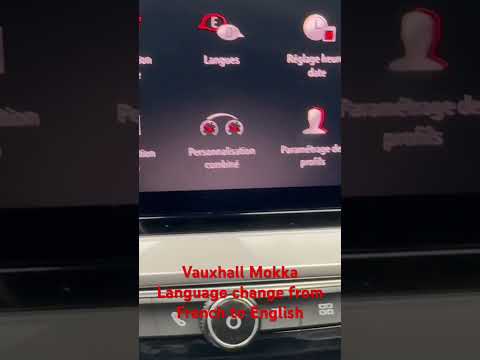 Vauxhall Mokka (2020-2026 / Mokkab) How to Change the Language on the Opel/Vauxhall Mokka B Instrument Cluster In this video, we can see how to set our language on the multimedia screen of the Opel/Vauxhall Mokka B: in this case, it is changed from French to English. …Read all… Posted on 14 September 2026 by ScegliAuto  Vauxhall Mokka (2012-2019 / Mokkaa) How to Remove the Instrument Cluster and Radio from an Opel Mokka How to remove the instrument cluster and radio from your Opel Mokka? Start by removing the front trim of the dashboard (as shown in the video) using a plastic …Read all… Posted on 26 March 2026 by ScegliAuto Instrument Cluster Vauxhall Mokka (2012-2019 / mokka a)
Vauxhall Mokka (2012-2019 / Mokkaa)How to Change the Driving Mode in an Opel Mokka A Let's see how to change the driving mode on the Opel Mokka A: it is a very simple procedure. Look at the centre of the dashboard, near the tunnel. There is a …Read all… Posted on 25 February 2026 by ScegliAuto
Vauxhall Mokka (2020-2026 / Mokkab)How to Change the Language on the Opel/Vauxhall Mokka B Instrument Cluster In this video, we can see how to set our language on the multimedia screen of the Opel/Vauxhall Mokka B: in this case, it is changed from French to English. …Read all… Posted on 14 September 2026 by ScegliAuto
Vauxhall Mokka (2012-2019 / Mokkaa)How to Remove the Instrument Cluster and Radio from an Opel Mokka How to remove the instrument cluster and radio from your Opel Mokka? Start by removing the front trim of the dashboard (as shown in the video) using a plastic …Read all… Posted on 26 March 2026 by ScegliAuto Cigarette lighter (1) Airbag (4) Antenna (1) Car stereo (9) Battery (4) Transmission (1) Spark plugs (3) Glow plugs (1) Body (5) Key (21) Timing belt (16) V-belt (1) Onboard computer (9) Checks and maintenance (33) Dashboard (3) Brake rotors (2) Side marker light (3) Headlight (2) Tail light (2) Fog lights (4) Air filter (13) Cabin air filter (28) Fuel filter (1) Diesel fuel filter (6) Oil filter (6) Parking brake (13) Accessory kit (1) Light bulb (5) Side marker bulb (1) Headlight bulb (17) Tail light bulb (9) Interior dome light bulb (1) Antifreeze coolant (1) Instrument panel light (1) License plate light (2) Handle (1) Engine (2) Engine oil (8) Clock (13) Door trim panel (3) Front bumper (1) Rear bumper (2) Brake pads (6) Tires (1) Shift knob (2) Pump (2) Car door (1) Push button (1) Instrument cluster (3) Wheel (1) Fuse box (23) Seat (6) Engine coolant temperature sensor (1) Brake system (1) Warning light – error code (18) Tire pressure warning light (48) Service warning light (90) Fuel cap (2) Windshield wipers (10) Thermostat (1) EGR valve (3) Side window (1) |
How to Set the Time in an Audi A4?
In this tutorial, you will see how to set the time in an Audi A4, a very simple and quick operation to perform after replacing the battery or when the time changes. First, insert the key and turn on the instrument cluster. Then, press the "SETUP" button located on the center console. Next, press the upper left arrow button, navigate to the "Time" option, and use the central knob to adjust the clock. Finally, set any necessary formats and save by returning to the main screen. by ScegliAuto More videos
|
|
For advertising on this site Write to info@scegliauto.com
ScegliAuto is not responsible for any inaccuracy of the data in the lists. To report any inaccuracy or your business (if you own the business in question), please write to info@scegliauto.com
Number of seconds to generate the page: 0.008
(c) ScegliAuto 2026 - info@scegliauto.com - Privacy policy VAT number: IT01247470535 |
