
|
Do it yourself
| |||
| ||||



How to Enter the Radio Code on an Opel Meriva A
Model: Vauxhall Meriva
Meriva A, MK 1
- Years:
2003, 2004, 2005, 2006, 2007, 2008, 2009, 2010
Video tutorial
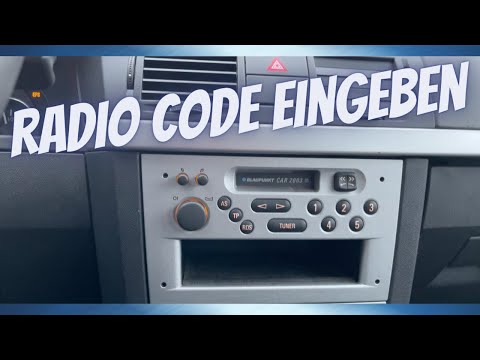
In this video, you can see how to enter the radio code - make sure you are certain - on the Opel Meriva version A: before entering the code, press the "AS" button located on the centre console. On the screen, you will see a number: 10. This means you have ten attempts available to enter the correct code: each time you make a mistake, the counter will decrease by one. To enter the first number (which in our case is a 2), go to the keypad and press the first button three times (as you start from zero). Do the same for the second, third, and fourth numbers (second button, third button, fourth button, always remembering that you start from zero). Confirm by holding down "AS". If everything is correct, you will hear a "beep" and the screen will display "program memo".
Updated on 24 October 2026 by ScegliAuto
Related tutorials
Vauxhall Meriva
(2003-2010 /
Meriva A, MK 1)
In this brief guide, you will find instructions to unlock the standard radio and radio stations on the Opel Meriva. First, get into the vehicle and t…
Vauxhall Meriva
(2003-2010 /
Meriva A, MK 1)
In this tutorial, you will learn how to enter the radio unlock code in the Opel Meriva, an extremely simple and quick operation to perform after repl…

Vauxhall Meriva
(2003-2010 /
Meriva A, MK 1)
In this video we can see how to remove the radio from an Opel Meriva "A" with CD30 radio model, as indicated by the code on the device itself. To rem…
Other guides you may be interested in |
Frequently Asked QuestionsHow to open the boot if it is stuck on a Mercedes B-Class?
On the Mercedes B-Class, the boot may become stuck, possibly due to a problem with the control button or the lock actuator. In this case, perform the emergency opening by following the simple procedure shown in this tutorial. First, unlock the locks with the remote control, then open the rear doors and, by operating the indicated lever, lower the backrest of the seat. Next, go inside the boot, locate the indicated gap, and manually unlock the lock using a small screwdriver. by ScegliAuto More videos
|
|
For advertising on this site Write to info@scegliauto.com
ScegliAuto is not responsible for any inaccuracy of the data in the lists. To report any inaccuracy or your business (if you own the business in question), please write to info@scegliauto.com
Number of seconds to generate the page: 0.074
(c) ScegliAuto 2026 - info@scegliauto.com - Privacy policy VAT number: IT01247470535 |
