
|
Do it yourself
| |||
| ||||


How to reset the service light on the Opel/Vauxhall Astra K
Model: Vauxhall Astra
Astra K
- Years:
2015, 2016, 2017, 2018, 2019, 2020, 2021, 2022
Video tutorial
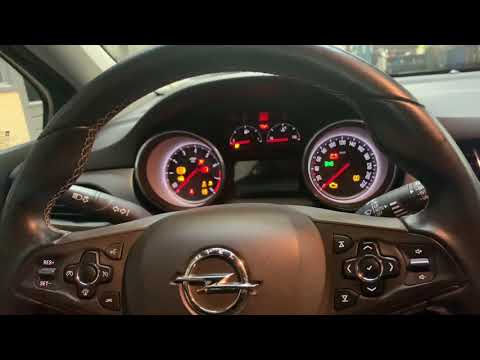
In this video we see how to reset the service light on an Opel/Vauxhall Astra K with a digital instrument panel and steering wheel controls. We turn on the instrument panel, locate the windshield wiper lever on the right side of the steering wheel, and press the "menu" button on the tip of the lever. We use the buttons on the lever to scroll through the options on the instrument panel and select the icon representing the car. From here we find the "oil life" option, and hold down the button on the tip of the lever for a few seconds. A confirmation window will appear on the display, and using the lever we select "yes" and confirm by pressing the button on the lever again. The system will display a confirmation message and the oil life value will return to 100%.
Posted on 10 September 2025 by ScegliAuto
Related tutorials
Vauxhall Astra
(2015-2022 /
Astra K)
…

Vauxhall Astra
(2021-2026 /
Astra L)
To reset the service light on an Opel Astra, get in the car and turn on the instrument panel without starting the engine. Use the buttons on the stee…
Vauxhall Astra
(2015-2022 /
Astra K)
To reset the service light on an Opel Astra, turn the key to switch on the instrument cluster: you will need to navigate the menu using the direction…
Other guides you may be interested in
|
How to Remove the Rear Bumper on a Peugeot 308
This article outlines the procedure to remove and replace the rear bumper on a Peugeot 308 T9. First, remove the screws located in the wheel arch of the rear wheels, then remove the plastic clips underneath the bumper. Next, take off the wheel arch cover, and remove the plastic nut. After removing the nut, disconnect the connectors present. Now, remove the fixing screws located underneath the bumper and also the plastic clips. Once all clips and screws are removed, you can take off the bumper for repair or replacement. by ScegliAuto More videos
|
|
For advertising on this site Write to info@scegliauto.com
ScegliAuto is not responsible for any inaccuracy of the data in the lists. To report any inaccuracy or your business (if you own the business in question), please write to info@scegliauto.com
Number of seconds to generate the page: 0.065
(c) ScegliAuto 2026 - info@scegliauto.com - Privacy policy VAT number: IT01247470535 |
