
|
Do it yourself
| |||
| ||||


How to Replace the Remote Battery on an Opel Insignia?
Model: Vauxhall Insigna
Insigna A, MK 1
- Years 2008-2017
To replace the remote battery on an Opel Insignia, lift the key by pressing the button on the top of the device: once the key is lifted, leverage inside its housing to detach the panel at the back. This will allow you to completely remove the underlying battery from its seat to insert the new one: this can now be covered with the corresponding panel, ensuring everything functions correctly after the replacement.
Posted on 28 September 2026 by ScegliAuto
Video tutorial
Related tutorials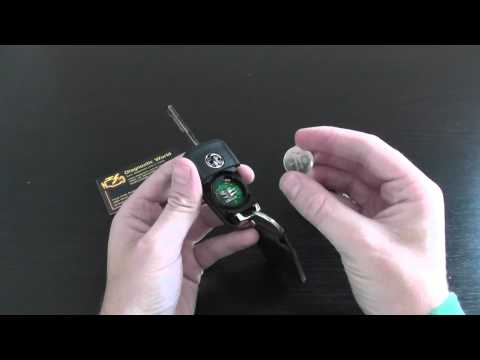
Vauxhall Insigna
(2008-2017 /
Insigna A, MK 1)
To replace the battery of the Opel Insignia remote, press the button at the top of the device to lift the key. Once lifted, pry inside its housing to…

Vauxhall Insigna
(2008-2017 /
Insigna A, MK 1)
These brief and simple steps will allow you to disassemble and replace the battery of the key fob for the Opel Insignia. First, take your key fob and…

Vauxhall Insigna
(2017-2026 /
MK 2, Insigna B)
In this tutorial, you will see how to replace the remote battery in the Opel Insignia, an extremely simple and quick operation. For this, you will ne…
Other guides you may be interested in
|
How to Adjust the Headlights on a Dacia Sandero
To adjust the headlights on a Dacia Sandero, turn on the instrument panel by rotating the appropriate key in the ignition switch. Once the panel is on, use the knob located to the left of the steering column, at the bottom of the dashboard. Turning this knob counterclockwise will lower the beam of the headlights; conversely, turning it clockwise will raise the beam. Once the correct angle is found, you can turn off the instrument panel. by ScegliAuto More videos
|
|
For advertising on this site Write to info@scegliauto.com
ScegliAuto is not responsible for any inaccuracy of the data in the lists. To report any inaccuracy or your business (if you own the business in question), please write to info@scegliauto.com
Number of seconds to generate the page: 0.935
(c) ScegliAuto 2026 - info@scegliauto.com - Privacy policy VAT number: IT01247470535 |
