
|
Do it yourself
| |||
| ||||


How to Reset the Oil Light on the Opel Adam
Model: Vauxhall Adam
MK 1
- Years 2013-2019
Today, this short video tutorial will guide you through the steps to reset the oil light on an Opel Adam independently, after performing the required oil maintenance such as topping up or replacement. Once inside the vehicle, switch on the instrument cluster and use the button on the left lever of the steering wheel to access the car menu and select "Reset". Next, press the SET button to confirm the reset. After completing these two steps, you can switch off the instrument cluster.
Updated on 18 August 2026 by ScegliAuto
Video tutorial
Related tutorials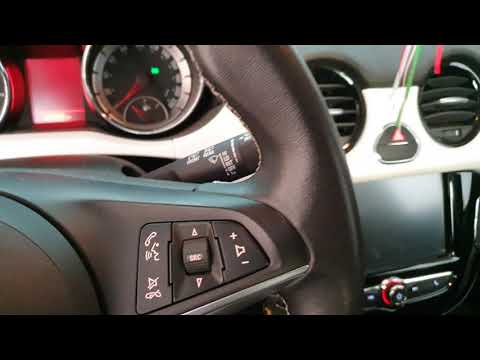
Vauxhall Adam
(2013-2019 /
MK 1)
After changing the oil in the Opel Adam, reset the system that alerts you when the service is due. Sit in the driver's seat and turn on the instrumen…

Vauxhall Adam
(2013-2019 /
MK 1)
The Service indicator that appears on the instrument panel of the Opel Adam can be reset by turning on the instrument panel and then pressing the MEN…

Vauxhall Adam
(2013-2019 /
MK 1)
To manually reset the service light on your Opel Adam, follow this procedure. First, get inside the car and turn on the instrument panel. Next, press…
Other guides you may be interested in
|
How to Reset the Central Locking of the Volkswagen Golf 4?
If the central locking system of the Volkswagen Golf 4 is not working, it is likely necessary to reset the system: to do this, open the driver's door and detach the side panel of the dashboard next to the steering wheel. Under this panel, you will find the fuses, including the one for the central locking, which is indicated in the manual as number 14. To reset the system, remove this fuse from its housing, then reinsert it or replace it with a new one of the same amperage: this will reset the central locking system. by ScegliAuto More videos
|

|
For advertising on this site Write to info@scegliauto.com
ScegliAuto is not responsible for any inaccuracy of the data in the lists. To report any inaccuracy or your business (if you own the business in question), please write to info@scegliauto.com
Number of seconds to generate the page: 0.208
(c) ScegliAuto 2026 - info@scegliauto.com - Privacy policy VAT number: IT01247470535 |
