
|
Do it yourself
| |||
| ||||


How to Replace the Battery in a Peugeot 2008
Model: Peugeot 2008
MK 1
- Years 2013-2019
In this guide, you will learn how to replace the battery in a Peugeot 2008 Mk1. This task can be completed independently without professional help. Follow the instructions carefully. Before you start, ensure the car is completely off and allow the engine bay to cool sufficiently. Once you have taken the necessary precautions, fully lift the bonnet and locate the battery on the right side. Remove the plastic protective cover and unscrew the two bolts securing the terminals using a 10mm spanner. After this, disconnect both the positive and negative terminals. Now, unscrew all the securing bolts and pull the battery towards you. Replace it with a new one, reattach the securing bolts, and finally, reconnect the two terminals.
Updated on 16 May 2026 by ScegliAuto
Video tutorial
Related tutorials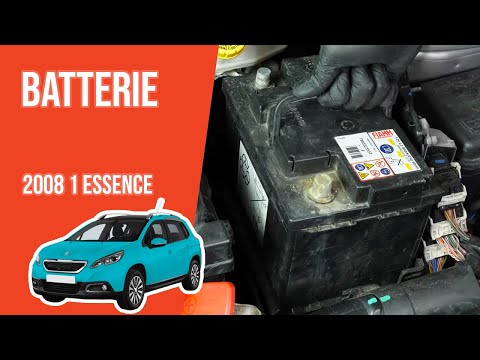
Peugeot 2008
(2013-2019 /
MK 1)
Today, discover the procedure and instructions to remove and replace the battery in your Peugeot 2008 1.2 Puretech. First, open the bonnet of the veh…

Peugeot 2008
(2019-2026 /
MK 2)
To replace the battery of the car remote of a Peugeot 2008 vehicle, we need to use a flat-head screwdriver and a DURACELL battery model CR 2032. Inse…

Peugeot 2008
(2013-2019 /
MK 1)
If the battery of your first series Peugeot 2008 is experiencing serious malfunctions or is discharging too quickly, then you have no choice but to f…
Other guides you may be interested in
|
How to Open a Stuck Boot on the Peugeot 407?
On the Peugeot 407, the boot may become stuck, possibly due to a problem with the control button or the lock actuator. In such cases, you can perform an emergency opening by following the simple procedure shown in this tutorial. First, open the rear doors, then lower the seat back by operating the release lever. Next, go inside the boot, locate the lock, and manually operate it using a flathead screwdriver. The boot will then be free to open. by ScegliAuto More videos
|
|
For advertising on this site Write to info@scegliauto.com
ScegliAuto is not responsible for any inaccuracy of the data in the lists. To report any inaccuracy or your business (if you own the business in question), please write to info@scegliauto.com
Number of seconds to generate the page: 0.197
(c) ScegliAuto 2026 - info@scegliauto.com - Privacy policy VAT number: IT01247470535 |
