
|
Do it yourself
| |||
| ||||


How to Change the System Language of the Peugeot 3008
Model: Peugeot 3008
MK 2, P84
- Years 2016-2023
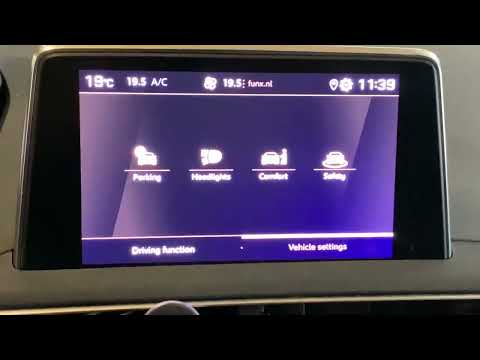
To manually change the system language used on your Peugeot 3008 second generation (2016-2022), follow the instructions in this dedicated guide. First, start the instrument cluster to use the central display. Once done, click on the settings icon located at the top right, then click on "Configuration" and then on "Language". Finally, scroll through the list and select your preferred language. Go back to save the changes made, and you are finished.
Updated on 27 June 2026 by ScegliAuto
Video tutorial
Related tutorials
Peugeot 3008
(2016-2023 /
MK 2, P84)
In this tutorial, you will see how to change the language of the onboard computer in the Peugeot 3008, a very simple and quick operation to perform, …

Peugeot 3008
(2016-2023 /
MK 2, P84)
The menu of a current car, such as the Peugeot 3008, is really extensive, in fact it provides not only a series of various information, vehicle healt…
Peugeot 3008
(2016-2023 /
MK 2, P84)
In this video tutorial, you will learn how to set the language on the Peugeot 3008 by following the instructions below. First, get into the vehicle a…
Other guides you may be interested in
|
Frequently Asked QuestionsFuses Location and Diagram for the Volkswagen Crafter
In this guide, we will look at the location of the fuse boxes and how to find their diagram for the Volkswagen Crafter. First, get inside the vehicle and start by removing the plastic cover found under the steering wheel, to access the internal fuse box; you will find another fuse box in the engine compartment by removing the plastic cover located next to the battery. At this point, use the owner's manual to find the fuse diagram, which will allow you to identify and replace any blown fuses with new ones! by ScegliAuto More videos
|
|
For advertising on this site Write to info@scegliauto.com
ScegliAuto is not responsible for any inaccuracy of the data in the lists. To report any inaccuracy or your business (if you own the business in question), please write to info@scegliauto.com
Number of seconds to generate the page: 0.646
(c) ScegliAuto 2026 - info@scegliauto.com - Privacy policy VAT number: IT01247470535 |
