
|
Do it yourself
| |||
| ||||


How to replace the front brake pads of the Renault Clio 2
Model: Renault Clio
Clio 2, MK 2
- Years 1998-2005
Today we will explain how to replace the front brake pads of the Renault Clio 2 on your own. We open the front hood and unscrew the brake fluid reservoir cap; loosen the tire bolts, lift the car and remove the wheel bolts to remove it and place it under the vehicle. Rotate the disc outwards and insert a flat tip screwdriver into the outer end of the slot on the front of the caliper. Push outwards to release the caliper and retract the piston, with a 13mm wrench unscrew the lower screw of the bolt and lock the nut; with a 17mm wrench repeat the operation on the upper screw of the bolt to remove the caliper and secure it on one of the coils of the shock absorber spring. Remove the pads by sliding them off the disc and clean the metal support with rust-proof spray and a brush. Grease the new pads and slide them into the support. Put the caliper back in place and tighten the bolt screws using a new screw and the 13mm wrench for the lower screw and the 17mm wrench for the upper screw; tighten the caliper using a torque wrench. After repeating the operation on the left front pad, mount both wheels back on the vehicle and lower the car. Screw the brake fluid cap back on and close the front hood, press the brake pedal and start the car.
Posted on 28 May 2025 by ScegliAuto
Video tutorial
Related tutorials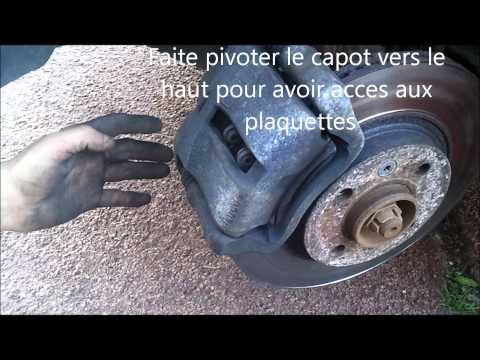
Renault Clio
(1998-2005 /
Clio 2, MK 2)
This guide shows how to replace the front brake pads, a relatively simple task to do at home.
Start by removing the wheel; loosen the bolts and then …

Renault Clio
(2012-2019 /
Clio IV, MK 4, Clio 4)
Let's see how to change the front brake pads of a Renault Clio IV: we start by unscrewing the cap of the brake fluid reservoir, then loosen the wheel…

Renault Clio
(2005-2013 /
MK 3, Clio 3, Clio III)
This is a really simple and quick task that can take about 5 minutes for the less experienced, simply by following this guide. Release the bonnet and…
Other guides you may be interested in
|
How to Bleed the Clutch on a Renault Clio?
To bleed the clutch on a Renault Clio, open the bonnet to access the components located in the engine bay: here, you will need to undo the screws that secure the battery in its housing, the intake manifold, and the coolant reservoir. This will allow you to locate the pipe through which the brake fluid flows: by inserting the other end of the pipe into a container, you can press the clutch pedal to expel all the fluid until it fills the container. by ScegliAuto More videos
|
|
For advertising on this site Write to info@scegliauto.com
ScegliAuto is not responsible for any inaccuracy of the data in the lists. To report any inaccuracy or your business (if you own the business in question), please write to info@scegliauto.com
Number of seconds to generate the page: 0.085
(c) ScegliAuto 2026 - info@scegliauto.com - Privacy policy VAT number: IT01247470535 |
