
|
Do it yourself
| |||
| ||||



How do you reset the onboard computer of the Renault Clio?
Model: Renault Clio
Clio IV, Clio 4, MK 4
- Years:
2012, 2013, 2014, 2015, 2016, 2017, 2018, 2019
This video is currently unavailable
In order to reset the on-board computer of the Renault Clio, you need to turn on the instrument panel so that you can navigate the menu that will appear on the central dashboard screen: you will need to select the "Vehicle" and then "On-board computer" options in order. At this point, the "Restore" option will appear and then you can confirm the reset by selecting "Yes": this way you will notice that the on-board computer settings have been restored. Finally, you can turn off the instrument panel by turning the key in the opposite direction.
Posted on 22 July 2025 by ScegliAuto
Related tutorials
Renault Clio
(2019-2026 /
Clio V, Clio 5)
Setting a different language on the onboard computer of a Renault Clio model 5 is a very simple and quick operation to perform independently. To carr…
Renault Clio
(2012-2019 /
Clio IV, Clio 4, MK 4)
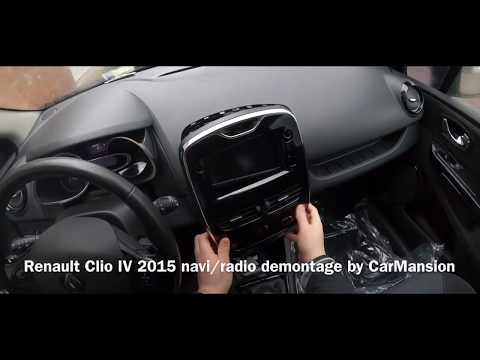
In today's tutorial video, we will see how to disassemble the Medianav onboard computer of a Renault Clio, as well as other Renault and Dacia models.…

Renault Clio
(2012-2019 /
Clio IV, Clio 4, MK 4)
Setting the language on the onboard computer of the Renault Clio IV is very simple. To perform this operation, turn on the instrument panel and the o…
Other guides you may be interested in
|
Frequently Asked QuestionsHow to Set the Time in an Audi A4?
In this tutorial, you will see how to set the time in an Audi A4, a very simple and quick operation to perform after replacing the battery or when the time changes. First, insert the key and turn on the instrument cluster. Then, press the "SETUP" button located on the center console. Next, press the upper left arrow button, navigate to the "Time" option, and use the central knob to adjust the clock. Finally, set any necessary formats and save by returning to the main screen. by ScegliAuto More videos
|
|
For advertising on this site Write to info@scegliauto.com
ScegliAuto is not responsible for any inaccuracy of the data in the lists. To report any inaccuracy or your business (if you own the business in question), please write to info@scegliauto.com
Number of seconds to generate the page: 0.128
(c) ScegliAuto 2026 - info@scegliauto.com - Privacy policy VAT number: IT01247470535 |
