
|
Do it yourself
| |||
| ||||


How to Remove the Rear Light on Renault Clio 4
Model: Renault Clio
Clio IV, MK 4, Clio 4
- Years 2012-2019
Open the boot and remove the two small screws that secure the rear light support, as shown in the video. At this point, you can detach the housing. By moving the two clips that hold the bulbs inside the housing, extract the unit consisting of the connector and the two bulbs. Now, unscrew the affected bulb and replace it with the new one. Snap the housing back in place, ensuring you hear the clips click shut, securing everything. Reinsert the light and screw in the two screws you initially removed.
Updated on 1 May 2026 by ScegliAuto
Video tutorial
Related tutorials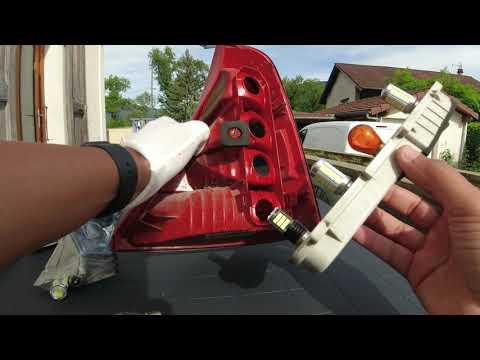
Renault Clio
(1998-2005 /
Clio 2, MK 2)
To remove the rear light on a Renault Clio 2, open the boot lid: on the side wall of the boot, near the light to be removed, there will be a knob tha…

Renault Clio
(2005-2013 /
MK 3, Clio 3, Clio III)
Disassembling the rear light of your Renault Clio Mk3 is very simple and to complete the operation you just need to follow a few simple steps. Let's …
Renault Clio
(2012-2019 /
Clio IV, MK 4, Clio 4)
If the rear brake light bulb on your 2015 Renault Clio has stopped working and you want to replace it yourself, follow the procedure described in thi…
Other guides you may be interested in |
How to Adjust the Brightness of the Instrument Cluster on a Peugeot 3008?
To adjust the brightness of the instrument cluster on a Peugeot 3008, you need to turn on the ignition and access the settings via the menu located in the central area of the dashboard. In the screen that appears, select the "Display Configuration" option: now, by selecting the "Brightness" option, you can adjust it using the dedicated slider that will appear on the screen. The adjustment should be made with the headlights on as well as with them off. Once the adjustment is complete, you can turn off the instrument cluster. by ScegliAuto More videos
|
|
For advertising on this site Write to info@scegliauto.com
ScegliAuto is not responsible for any inaccuracy of the data in the lists. To report any inaccuracy or your business (if you own the business in question), please write to info@scegliauto.com
Number of seconds to generate the page: 0.287
(c) ScegliAuto 2026 - info@scegliauto.com - Privacy policy VAT number: IT01247470535 |
