
|
Do it yourself
| |||
| ||||



How to Install a Dash Cam in the Tata Hexa
Model: Tata Hexa
MK 1
- Years:
2016, 2017, 2018, 2019, 2020
Video tutorial
As shown in the video, installing a dash cam in the Tata Hexa is quite simple. You need a basic understanding of electronics to install it. Start at the fuse box located under the steering wheel, which can be easily opened with a light press. Connect the dash cam switch to a positive terminal, then run the wire from inside the cabin to the left pillar where it says 'airbag' (this will need to be unscrewed) and route it through the upholstery above the windshield to your desired position.
Updated on 3 June 2026 by ScegliAuto
Related tutorials
Tata Hexa
(2016-2020 /
MK 1)
Today, follow these main instructions to remove and replace the factory radio with an Android unit in the Tata Hexa. First, get inside the vehicle an…

Tata Hexa
(2016-2020 /
MK 1)
In today's video, we will see how to deactivate the passenger airbag on a Tata Hexa, a necessary operation when, for example, installing a child seat…
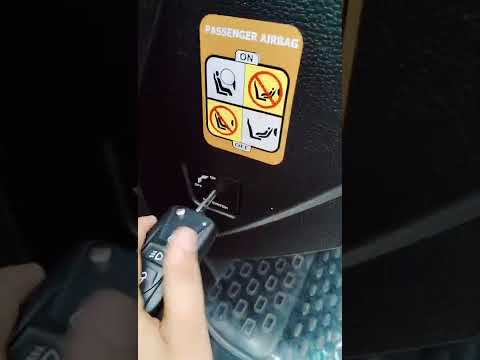
Tata Hexa
(2016-2020 /
MK 1)
In this tutorial, you will see how to disable the passenger airbag in the Tata Hexa, a very simple operation to perform whenever you position a rear-…
Other guides you may be interested in
|
How to Open the Fuel Flap on a Volkswagen Tiguan?
To open the fuel flap on a Volkswagen Tiguan, first unlock the car using the appropriate button on the remote. This will open the car and unlock the mechanism that controls the fuel flap. At this point, apply light pressure to the left side of the flap to open it and access the cap underneath. Once this is unscrewed, you can refuel and then close everything. by ScegliAuto More videos
|
|
For advertising on this site Write to info@scegliauto.com
ScegliAuto is not responsible for any inaccuracy of the data in the lists. To report any inaccuracy or your business (if you own the business in question), please write to info@scegliauto.com
Number of seconds to generate the page: 0.154
(c) ScegliAuto 2026 - info@scegliauto.com - Privacy policy VAT number: IT01247470535 |
