
|
Do it yourself
| |||
| ||||


How to Set the Daily Time on the VDO Tachograph
Model: (Various brands) Various
Video tutorial
In this video, we will see how to set the daily time on the VDO tachograph of a van. Press the button located on the right side of the device while simultaneously pressing the "minus" button. The screen displaying the date and time will appear. Press the "minus" button again, and it will start to flash for one minute. Press the "m" button, and a question mark will appear. Next, press the button on the left to confirm the stop, and the door will open so you can remove the disc. Close the drawer and wait for it to configure. Once it stops flashing and displays an exclamation mark, it is ready, and you can insert the new disc with your updated time.
Updated on 3 September 2026 by ScegliAuto
Related tutorials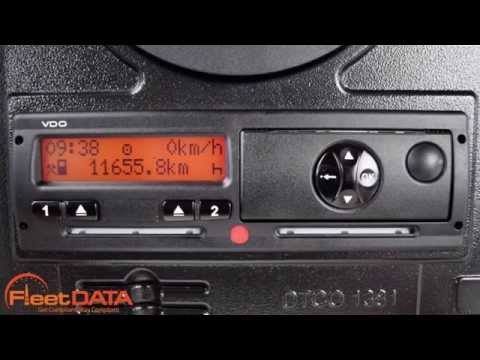
(Various brands) Various
The process for changing the time on a Siemens VDO digital tachograph may vary slightly depending on the model and version of the tachograph. However…

(Various brands) Various
Let's see how to set the local time on the VDO tachograph of a commercial vehicle: the purpose is to display the local time, for example when switchi…

(Various brands) Various
In this video we see something very important for those who drive a large commercial vehicle: how to check and change the local time of the VDO tacho…
Other guides you may be interested in |
How to Remove the Toll Tag Holder from the Car Windscreen
The toll tag holder is usually attached to the car windscreen to ensure that the toll tag functions immediately when passing through barriers. However, if you decide to remove the holder, you should follow this procedure: - Insert the toll tag into the holder; - Pull the holder inwards to detach it from the windscreen; you can use a glass scraper or a stiff plastic card to assist you; After removing the holder, it is essential to remove the adhesive from the windscreen. To remove the adhesive, we recommend using a solvent-based spray that will remove the glue without clouding the area. by ScegliAuto More videos
|
|
For advertising on this site Write to info@scegliauto.com
ScegliAuto is not responsible for any inaccuracy of the data in the lists. To report any inaccuracy or your business (if you own the business in question), please write to info@scegliauto.com
Number of seconds to generate the page: 0.040
(c) ScegliAuto 2026 - info@scegliauto.com - Privacy policy VAT number: IT01247470535 |
