
|
Do it yourself
| |||
| ||||


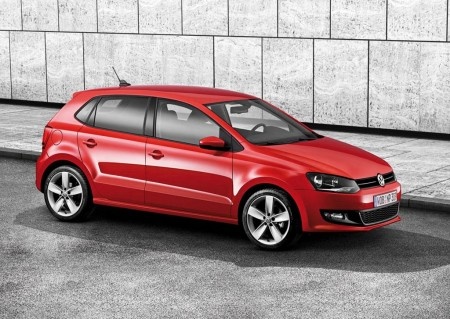
How to Replace the Front Headlight on a Volkswagen Polo
Model: Volkswagen Polo
Polo 5, Polo V, MK 5, MK V, 6R
- Years 2009-2017
To replace the front headlight on a Volkswagen Polo, turn off the engine and open the bonnet. Remove the upper fixing screws of the headlight unit. To access the side and lower fixings, it may be necessary to loosen or partially remove the front bumper by unscrewing the screws in the wheel arch and at the bottom. Once free, disconnect the main electrical connector by pressing the locking tab. Completely unscrew the headlight screws and pull it out from its housing. Position the new headlight correctly, connect the connector, and re-screw all fixings. Refit the bumper and close the bonnet. Turn on the lights to check the correct operation and alignment of the beam.
Posted on 27 September 2026 by ScegliAuto
Video tutorial
Related tutorials
Volkswagen Polo
(2009-2017 /
Polo 5, Polo V, MK 5, MK V, 6R)
With the help of the following video tutorial, we will explain how to remove the right front headlight of the VW Polo car. The steps to be followed a…

Volkswagen Polo
(2009-2017 /
Polo 5, Polo V, MK 5, MK V, 6R)
Today, we will replace the front headlight bulb on the Volkswagen Polo model 5. To carry out the replacement, we first need to remove the headlight. …

Volkswagen Polo
(2009-2017 /
Polo 5, Polo V, MK 5, MK V, 6R)
Is the front headlight of your car due for replacement? This guide shows how to remove the front headlight of the Polo. Lift the front bonnet to acce…
Other guides you may be interested in
|
How to set the clock on the Vespa 125 Primavera?
To set the clock on the Vespa 125 Primavera, press and hold the black button located just below the black knob on the bike: keep the button pressed until the hour number starts to flash. Once it is flashing, you can change the hours with single presses of the same button; then, by pressing and holding the button again, the hour number will stop flashing and the minute number will start to flash, which can be modified in the same way, confirming the input by holding the button. by ScegliAuto More videos
|
|
For advertising on this site Write to info@scegliauto.com
ScegliAuto is not responsible for any inaccuracy of the data in the lists. To report any inaccuracy or your business (if you own the business in question), please write to info@scegliauto.com
Number of seconds to generate the page: 0.081
(c) ScegliAuto 2026 - info@scegliauto.com - Privacy policy VAT number: IT01247470535 |
