
|
Do it yourself
| |||
| ||||


How to Install the Rear Camera on a Volkswagen Tiguan
Model: Volkswagen Tiguan
5N, MK 1
- Years 2007-2016
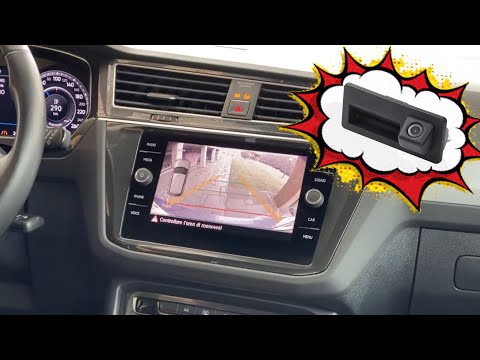
Let's go through the main steps that will assist you in the installation process of the rear camera on a Volkswagen Tiguan. First, obtain the appropriate kit for your vehicle; then open the tailgate and start preparing the camera, routing all the wiring along the side of the boot to reach the display that you will install on the dashboard (modifying the various wiring), as shown in the video. At this point, adjust the rear camera perfectly to ensure optimal visibility during parking manoeuvres, following the video tutorial to the end!
Updated on 11 August 2026 by ScegliAuto
Video tutorial
Related tutorials
Volkswagen Tiguan
(2016-2025 /
BW, MK 2, AD)
In this guide, we will see the instructions that will allow us to install the dash cam or camera on the dashboard of the Volkswagen Tiguan. First, we…

Volkswagen Tiguan
(2016-2025 /
BW, MK 2, AD)
To install the dashcam on the Volkswagen Tiguan, use an object to pry off the plastic cover located behind the internal rear-view mirror. Once remove…
Volkswagen Tiguan
(2016-2025 /
BW, MK 2, AD)
To install a reversing camera on the Volkswagen Tiguan, open the boot compartment and remove the CD player using the appropriate tools. This will all…
Other guides you may be interested in
|
Fuses Location and Diagram for the Volkswagen Crafter
In this guide, we will look at the location of the fuse boxes and how to find their diagram for the Volkswagen Crafter. First, get inside the vehicle and start by removing the plastic cover found under the steering wheel, to access the internal fuse box; you will find another fuse box in the engine compartment by removing the plastic cover located next to the battery. At this point, use the owner's manual to find the fuse diagram, which will allow you to identify and replace any blown fuses with new ones! by ScegliAuto More videos
|
|
For advertising on this site Write to info@scegliauto.com
ScegliAuto is not responsible for any inaccuracy of the data in the lists. To report any inaccuracy or your business (if you own the business in question), please write to info@scegliauto.com
Number of seconds to generate the page: 0.056
(c) ScegliAuto 2026 - info@scegliauto.com - Privacy policy VAT number: IT01247470535 |
