
|
Do it yourself
| |||
| ||||


Replacing the Boot and Maintaining the Joint
Model: Audi A6
MK 2, C5
- Years 1997-2004
In this tutorial, the boot of a drive axle joint on an Audi A6 is replaced. Remove the wheel corresponding to the joint you will be working on. Remove the brake rotor with a 17 mm Allen wrench. Take off the piece that protects the joint, then unscrew the bolts that secure the drive axle. Turn the steering wheel fully to the right and slide out the drive axle. Place it in a bench vise and remove the clamp that secures the worn joint boot. Extract the joint (using a hammer if necessary). Disassemble the joint and carefully clean each part. Dry each piece, and if you are also maintaining the other joint of the drive axle, swap the components (right with left and vice versa) to extend their efficiency. Carefully reassemble the joint. Take a new boot and install it on the drive axle; mount and secure the clamp that holds it. Release the air from the boot using a small screwdriver as a lever to let it vent. Reassemble everything by reversing the disassembly steps.
Updated on 10 February 2026 by ScegliAuto
This video is currently unavailable
Related tutorials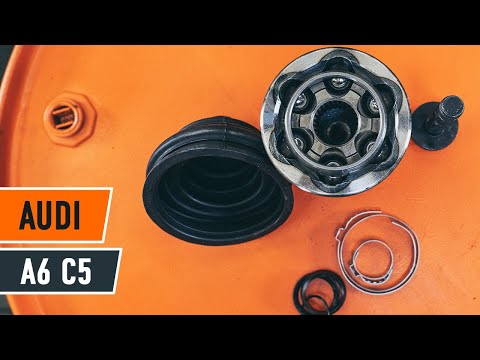
Audi A6
(1997-2004 /
MK 2, C5)
In this video tutorial, you can see how to replace the CV joint on the Audi A6. The first step is to loosen the bolts on the front wheel rim. Next, l…

Audi A6
(1997-2004 /
MK 2, C5)
To replace the control arm of the Audi A6, loosen the nuts of the front wheel and lift the car with a bridge; finish unscrewing the nuts and remove t…

Audi A6
(2011-2018 /
C7, MK 4)
These quick steps will illustrate the process of disassembling and replacing the gear knob of the Audi A6 automatic transmission. First, we get into …
Other guides you may be interested in
|
How to Bleed the Clutch on a Renault Clio?
To bleed the clutch on a Renault Clio, open the bonnet to access the components located in the engine bay: here, you will need to undo the screws that secure the battery in its housing, the intake manifold, and the coolant reservoir. This will allow you to locate the pipe through which the brake fluid flows: by inserting the other end of the pipe into a container, you can press the clutch pedal to expel all the fluid until it fills the container. by ScegliAuto More videos
|
|
For advertising on this site Write to info@scegliauto.com
ScegliAuto is not responsible for any inaccuracy of the data in the lists. To report any inaccuracy or your business (if you own the business in question), please write to info@scegliauto.com
Number of seconds to generate the page: 0.540
(c) ScegliAuto 2026 - info@scegliauto.com - Privacy policy VAT number: IT01247470535 |
