
|
Do it yourself
| |||
| ||||


How to Install AUX in Audi A6 Models
Model: Audi A6
C6, MK 3
- Years:
2004, 2005, 2006, 2007, 2008, 2009, 2010, 2011, 2012
Video tutorial
To install the AUX in Audi A6 models produced from 2004 to 2012, you will need to remove some parts of the vehicle's dashboard. As shown in the video, first remove the outer part of the dashboard on the passenger side, and then use a Torx wrench to remove the glove compartment. Once the glove compartment is completely removed from its housing, you can proceed with the installation of CAR PLAY. Start by inserting the new connectors into the ports and connecting the various wires as indicated in the instruction manual. Once everything is assembled, reattach the glove compartment and install the antenna on the center console.
Updated on 6 September 2026 by ScegliAuto
Related tutorials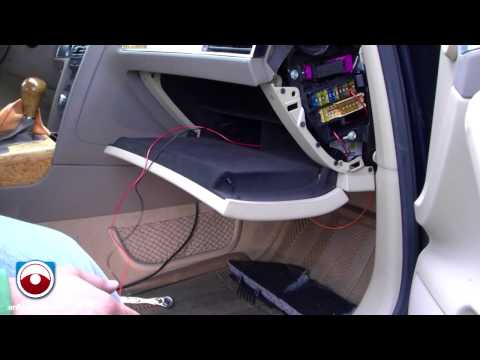
Audi A6
(2004-2012 /
C6, MK 3)
This video section explains how to install a Dension adapter (a manufacturer of integration systems for iPod/iPhone in cars) on an Audi A6. Use a pla…

Audi A6
(1997-2004 /
MK 2, C5)
Setting the clock on an Audi A6 C5 is a very simple and quick operation. First, turn on the ignition. Then, press the button/dial located on the inst…

Audi A6
(2018-2026 /
MK 5, C8)
If you want to find out where the OBD2 port is located in your Audi A6 C8, you just need to read the procedure described in the following guide and a…
Other guides you may be interested in
|
How to Activate the Automatic Folding and Unfolding of the Wing Mirrors on the Jeep Compass
Follow these brief instructions to activate the automatic folding and unfolding of the external wing mirrors on the Jeep Compass. First, get inside the vehicle and turn on the ignition; then press the button located beneath the mirror glass adjustment to electrically open the mirror, as shown in the video. Pressing the button in the opposite direction will close the mirrors; by holding the button, the mirrors will open and close automatically! by ScegliAuto More videos
|
|
For advertising on this site Write to info@scegliauto.com
ScegliAuto is not responsible for any inaccuracy of the data in the lists. To report any inaccuracy or your business (if you own the business in question), please write to info@scegliauto.com
Number of seconds to generate the page: 0.047
(c) ScegliAuto 2026 - info@scegliauto.com - Privacy policy VAT number: IT01247470535 |
