
|
Do it yourself
| |||
| ||||



How to Reset the Service on a BMW X3 F25
Model: BMW X3
MK 2, F25
- Years:
2010, 2011, 2012, 2013, 2014, 2015, 2016, 2017
Video tutorial
In this video, let's see how to reset the service on a BMW X3 F25: turn on the ignition without starting the engine, then press and hold the button to select the onboard computer, located at the bottom left of the instrument panel. After about 10 seconds, the first service item will be displayed; briefly press the button to view the other service items, and the screen will show: "reset executable". Hold the button for three seconds. The display will show "execute reset"; hold the button again for three seconds. The screen will then display "reset in progress" and subsequently "reset successful". Operation completed.
Updated on 12 October 2026 by ScegliAuto
Related tutorials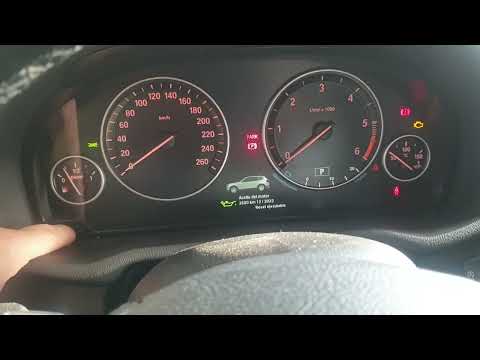
BMW X3
(2010-2017 /
MK 2, F25)
In this video, you can see how to reset the service light on a BMW X3 F25: with all doors closed, turn on the ignition without starting the engine. P…

BMW X3
(2010-2017 /
MK 2, F25)
In the following mini guide dedicated to those of you who own a BMW X3 F25, we will explain the steps you need to take in order to manually reset the…

BMW X3
(2010-2017 /
MK 2, F25)
In this new guide dedicated to your BMW X3 F25 (2010-2017), you will learn the steps to manually reset the maintenance light that turns on every time…
Other guides you may be interested in
|
Frequently Asked QuestionsHow to Reset the Tyre Pressure Warning Light on the Jeep Renegade?
To reset the tyre pressure warning light on the Jeep Renegade, inflate the tyres until they reach the recommended pressure: this value is indicated on the sticker attached to the driver’s door pillar. Once the tyres are properly inflated, navigate through the menu that appears on the instrument cluster until you find the tyre pressure option. At this point, press and hold the OK button on the right side of the steering wheel to make the warning light disappear. by ScegliAuto More videos
|
|
For advertising on this site Write to info@scegliauto.com
ScegliAuto is not responsible for any inaccuracy of the data in the lists. To report any inaccuracy or your business (if you own the business in question), please write to info@scegliauto.com
Number of seconds to generate the page: 0.100
(c) ScegliAuto 2026 - info@scegliauto.com - Privacy policy VAT number: IT01247470535 |
