
|
Do it yourself
| |||
| ||||


How to use the ELM 327 scanner to clear errors on the Dacia Duster
Model: Dacia Duster
HM, MK 2
- Years 2017-2024
In this video we can see how to use the ELM 327 scanner to diagnose errors on the Dacia Duster. It is an inexpensive device that can easily be found on major e-commerce platforms. For example, on Amazon we can find it with the code B00WU97RH8 at the price of 11.96 euros, with free delivery for Prime customers. When the engine light comes on, to find error codes, we need to install our device in the EOBD socket, which is located in the glove compartment. Through the Bluetooth connection, we can then see on the inCarDoc application installed on our phone, what our scanner reads from the diagnostic socket: in fact, it immediately finds an error related to the catalytic converter, but it is an error that does not affect the system's functionality, so we can delete it, and in this way the light on the display will disappear.
Posted on 29 November 2024 by ScegliAuto
Video tutorial
Related tutorials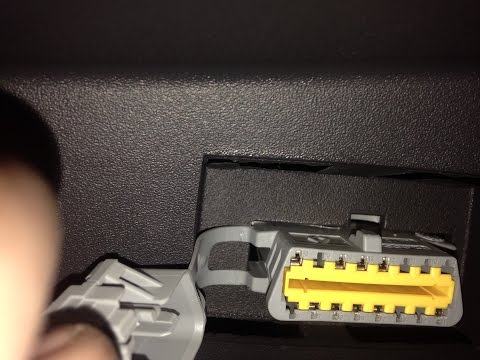
Dacia Duster
(2010-2017 /
HS, MK 1)
In this video, you will see where the OBD port is located in the Dacia Duster, useful if you need to read the error codes recorded by the ECU using t…

Dacia Duster
(2017-2024 /
HM, MK 2)
To clear the tyre pressure warning light displayed on the dashboard of the Dacia Duster, first inflate the tyres to the optimal pressure: this value …

Dacia Duster
(2024-2026 /
P1310)
You can completely clear the tyre pressure warning light on the Dacia Duster by inflating the tyres to the optimal pressure: this value is written on…
Other guides you may be interested in
|
Frequently Asked QuestionsHow to set the clock on the Opel Zafira
Setting the clock to the current Italian time on an Opel Zafira model B vehicle is a very simple operation, which can also be done independently thanks to our short instructional video. The first thing to do is to turn on the instrument panel and then press the SETTING button, located on the central dashboard. Once inside the menu, use the buttons to navigate to the clock setting. Change the hours and minutes and restart the instrument panel. If the clock is not updated, a diagnosis may be necessary at the radio or vehicle control unit. by ScegliAuto More videos
|

|
For advertising on this site Write to info@scegliauto.com
ScegliAuto is not responsible for any inaccuracy of the data in the lists. To report any inaccuracy or your business (if you own the business in question), please write to info@scegliauto.com
Number of seconds to generate the page: 0.162
(c) ScegliAuto 2026 - info@scegliauto.com - Privacy policy VAT number: IT01247470535 |
