
|
Do it yourself
| |||
| ||||


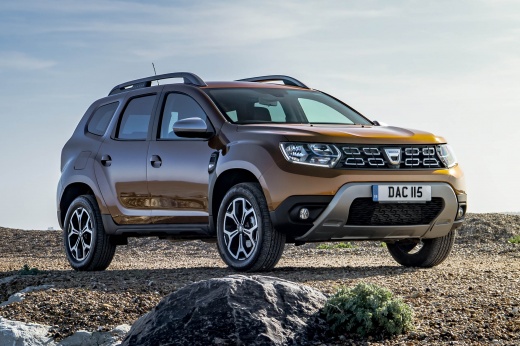
Installation of the Rear Bumper Protection Film for the Dacia Duster MK2
Model: Dacia Duster
HM, MK 2
- Years:
2017, 2018, 2019, 2020, 2021, 2022, 2023, 2024
Video tutorial
During loading and unloading of the boot of the Dacia Duster, it is possible to scratch the edge of the bumper at the base of the tailgate. To prevent this, apply a protective film to the edge. Various colours are available on the market to match your taste and the colour of your vehicle. To install it, open the tailgate and mark the centre of the edge and the film, degrease the surface of the edge, align the two marks, and begin removing the adhesive backing, applying the film from the centre towards one side using an old credit card to avoid bubbles under the surface. Once you reach the end, complete the other side.
Updated on 5 October 2026 by ScegliAuto
Related tutorials
Dacia Duster
(2010-2017 /
MK 1, HS)
Today's main instructions will show you the procedure for removing and replacing the horn or sound signal on the Renault Duster, as well as the Dacia…

Dacia Duster
(2017-2024 /
HM, MK 2)
To remove the front bumper of the Dacia Duster, start by positioning the vehicle on a ramp or level surface. This will allow you to work safely and s…

Dacia Duster
(2010-2017 /
MK 1, HS)
How do you remove the grille of a Dacia Duster? Let's see how to detach the piece from above the front bumper. Using a plastic lever, pry between the…
Other guides you may be interested in
|
How to reset the tyre pressure warning light on the Kia Niro EV?
To reset the tyre pressure warning light on the Kia Niro EV, inflate the tyres until they reach the correct pressure value. This value is indicated on the sticker attached to the driver's door pillar. Once the tyres are inflated, turn on the instrument cluster to check that the warning light has completely disappeared from the display. If it is still present, you may need to drive for a few miles to ensure it disappears completely from the screen. by ScegliAuto More videos
|
|
For advertising on this site Write to info@scegliauto.com
ScegliAuto is not responsible for any inaccuracy of the data in the lists. To report any inaccuracy or your business (if you own the business in question), please write to info@scegliauto.com
Number of seconds to generate the page: 0.020
(c) ScegliAuto 2026 - info@scegliauto.com - Privacy policy VAT number: IT01247470535 |
