
|
Do it yourself
| |||
| ||||


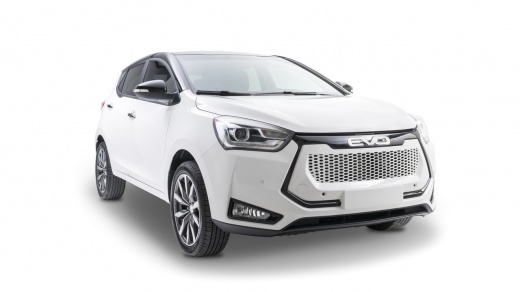
How to connect the smartphone via Bluetooth and Android Auto on the EVO 3
Model: EVO Evo 3
MK 1
- Years 2021-2026
Shortly we will see the instructions that will allow us to connect our smartphone via Bluetooth to Android Auto of the EVO 3. First of all, we get on board the car and start turning on the instrument panel; then we connect the cable to the USB port, allowing access to Android Auto, as shown in the video. At this point, we connect the smartphone via Bluetooth, pairing it with a code, accessing the various available functions; in addition to Android Auto, Apple Carplay is also available, following the video tutorial until the end!
Posted on 11 November 2025 by ScegliAuto
Video tutorial
Related tutorials
EVO Evo 3
(2021-2026 /
MK 1)
Updating the EVO 3 is very simple to execute. The first step is to connect to the SIMRAD website using your browser and access the "Manuals and Updat…

EVO Evo 3
(2021-2026 /
MK 1)
You have certainly heard about cleaning the injectors of your engine, which should be done periodically using specific additives sold in car parts st…

EVO Evo 3
(2021-2026 /
MK 1)
This video is an excellent guide demonstrating how you can achieve effective soundproofing of the engine bay, cabin, etc., even on your own, with goo…
Other guides you may be interested in
|
How to Adjust the Brightness of the Instrument Cluster on a Peugeot 3008?
To adjust the brightness of the instrument cluster on a Peugeot 3008, you need to turn on the ignition and access the settings via the menu located in the central area of the dashboard. In the screen that appears, select the "Display Configuration" option: now, by selecting the "Brightness" option, you can adjust it using the dedicated slider that will appear on the screen. The adjustment should be made with the headlights on as well as with them off. Once the adjustment is complete, you can turn off the instrument cluster. by ScegliAuto More videos
|
|
For advertising on this site Write to info@scegliauto.com
ScegliAuto is not responsible for any inaccuracy of the data in the lists. To report any inaccuracy or your business (if you own the business in question), please write to info@scegliauto.com
Number of seconds to generate the page: 0.100
(c) ScegliAuto 2026 - info@scegliauto.com - Privacy policy VAT number: IT01247470535 |
