
|
Do it yourself
| |||
| ||||


Video tutorial
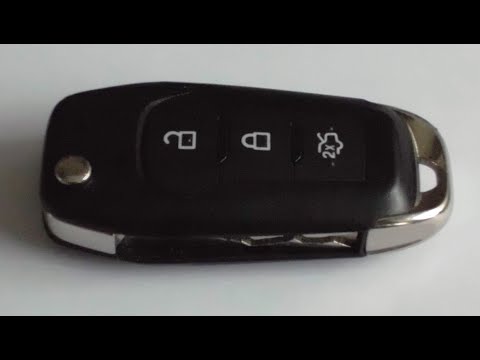
Let's see how to change the battery of the remote for a Ford Puma. You will need a CR2032 battery (which can be found at any electronics store or even at supermarkets) and a small flat screwdriver. A common mistake is thinking you need to open the back (where the Ford logo is), but the battery is on the other side, under the button cover. Gently insert the tip of the screwdriver into the gap between the button shell and the rest of the key, and lever it until the two halves separate. You will then see the battery in its housing. Replace it, ensuring correct polarity. Reassemble the two halves and press until they click together.
Posted on 18 September 2026 by ScegliAuto
Related tutorials
Ford Puma
(2019-2026 /
MK 1)
Very short video tutorial attached here to fully understand how to replace, in less than a minute, the battery of the key/remote of the Ford Puma and…

Ford Puma
(2019-2026 /
MK 1)
In this new guide you will find the description of all the steps you need to follow to correctly replace the battery inside the remote control of you…
Ford Puma
(2019-2026 /
MK 1)
As shown in this tutorial, replacing the remote battery of the Ford Puma is an extremely simple and quick operation. To do this, you will need a smal…
Other guides you may be interested in
|
How to Reset the Tyre Pressure Warning Light on a Kia Rio?
The tyre pressure warning light displayed on the instrument cluster of the Kia Rio can be reset by inflating the tyres until they reach the recommended pressure value: this value is indicated on the sticker affixed to the driver's door pillar. Once all tyres have been inflated to the recommended pressure, turn on the ignition to check that the light has disappeared: if it is still present, it may be necessary to drive for a few miles, allowing the sensors to work and thus turning off the light. by ScegliAuto More videos
|
|
For advertising on this site Write to info@scegliauto.com
ScegliAuto is not responsible for any inaccuracy of the data in the lists. To report any inaccuracy or your business (if you own the business in question), please write to info@scegliauto.com
Number of seconds to generate the page: 0.102
(c) ScegliAuto 2026 - info@scegliauto.com - Privacy policy VAT number: IT01247470535 |
