
|
Do it yourself
| |||
| ||||


How to Replace the Daytime Running Lights on a Kia Picanto
Model: Kia Picanto
- Years 2018-2026
To do a good job, start by turning the steering wheel towards the side of the headlight to be replaced. Behind the wheel (in the wheel arch), you will find two plastic clips with a cross in the centre. Use a screwdriver to turn each clip 90° (1/4 turn) and remove them. Under the bumper, you will find two more. With the four clips removed, pull the wheel arch lining back: now you have enough space to reach the bulb holder; turn it counter-clockwise and the holder and bulb will come out of the headlight. Replace the bulb and insert it back in the same way. Turn on the headlight to see if it works, and now you can reattach the four clips and close everything up.
Posted on 29 September 2026 by ScegliAuto
Video tutorial
Related tutorials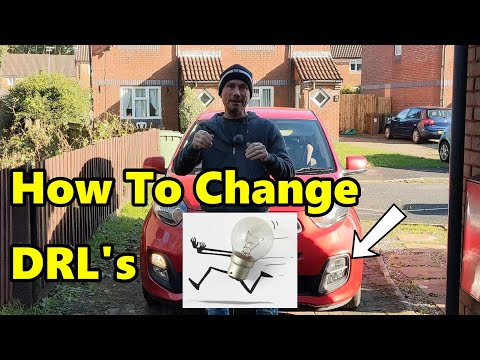
Kia Picanto
(2011-2018 /
TA, MK 2)
To replace the daytime running light bulb on a Kia Picanto, you need to unscrew the screws that secure the inner cover of the wheel arch correspondin…

Kia Picanto
(2011-2018 /
TA, MK 2)
See how to change the daytime running lights on the Kia Picanto 2nd series, without removing the wheel. Turn the steering wheel towards the opposite …

…
Other guides you may be interested in
|
How to Adjust the Headlights on a Dacia Sandero
To adjust the headlights on a Dacia Sandero, turn on the instrument panel by rotating the appropriate key in the ignition switch. Once the panel is on, use the knob located to the left of the steering column, at the bottom of the dashboard. Turning this knob counterclockwise will lower the beam of the headlights; conversely, turning it clockwise will raise the beam. Once the correct angle is found, you can turn off the instrument panel. by ScegliAuto More videos
|
|
For advertising on this site Write to info@scegliauto.com
ScegliAuto is not responsible for any inaccuracy of the data in the lists. To report any inaccuracy or your business (if you own the business in question), please write to info@scegliauto.com
Number of seconds to generate the page: 0.299
(c) ScegliAuto 2026 - info@scegliauto.com - Privacy policy VAT number: IT01247470535 |
