
|
Do it yourself
| |||
| ||||


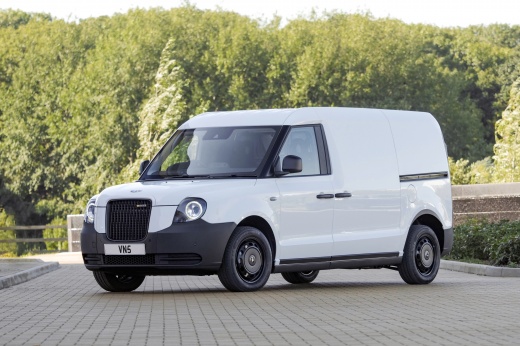
Guide to Using the Levc VN5
Model: LEVC Vn5
MK 1
- Years:
2020, 2021, 2022, 2023, 2024, 2025, 2026
This video is currently unavailable
In this brief guide, find the instructions and main functions to start getting to know the Levc VN5. First, unlock the vehicle with the remote and get inside the car; on the center console, you will find the large display, as well as the onboard computer, navigation, access to all multimedia content, and air conditioning, as shown in the video. The gear lever allows you to shift into "D" for drive, reverse, and "N" for neutral; next to the lever, you will find the handbrake button. The vehicle is also equipped with several storage compartments and multiple seat adjustments, ensuring maximum comfort for the driver and passengers!
Updated on 18 July 2026 by ScegliAuto
Related tutorials
LEVC Vn5
(2020-2026 /
MK 1)
In this guide, discover the various features of the new Electric Van Levc VN5. As a van, it offers ample space in the rear for loading any type of it…
LEVC Vn5
(2020-2026 /
MK 1)
In today's tutorial video, we will see the battery placement and how to restart the Levc VN5 electric vehicle, following the instructions below. Firs…

LEVC Vn5
(2020-2026 /
MK 1)
LEVC – London Electric Vehicle Company – the historic manufacturer of London taxis, has begun production of its new LEVC Van VN5 Electric, a small el…
Other guides you may be interested in
|
Where are the fuses located on the Renault Laguna?
On the Renault Laguna, the fuses are located inside the fuse boxes installed in the vehicle: in this car model, you will find two boxes for containing the fuses. The first is in the fuse box on the left side of the dashboard, accessible by opening the driver's door: here you will find the fuses for the windscreen wipers, fog lights, horn, etc. The second box is located on the right side of the engine compartment: here you will find the fuses for the dipped headlights, radiator fan, alternator, etc. by ScegliAuto More videos
|
|
For advertising on this site Write to info@scegliauto.com
ScegliAuto is not responsible for any inaccuracy of the data in the lists. To report any inaccuracy or your business (if you own the business in question), please write to info@scegliauto.com
Number of seconds to generate the page: 0.031
(c) ScegliAuto 2026 - info@scegliauto.com - Privacy policy VAT number: IT01247470535 |
