
|
Do it yourself
| |||
| ||||


How to Change the Battery on a Maruti Alto 800
Model: Maruti Alto 800
AOD
- Years 2012-2023
If you intend to replace the battery on your vehicle because you are experiencing starting difficulties, especially in cold weather, you can find the instructions below and refer to the video as well. After opening the hood, locate the battery on the left side and first disconnect the negative terminal, followed by the positive terminal. Next, remove the nuts securing the battery hold-down to the engine compartment, and at this point, you can extract the battery. Place the new battery in the housing, reconnect the positive terminal first, then the negative terminal, and finally, reattach the hold-down nuts.
Updated on 25 May 2026 by ScegliAuto
Video tutorial
Related tutorials
Maruti Alto 800
(2012-2023 /
AOD)
Today's guide will show you the main steps to time the engine of the Suzuki Alto 800 and Maruti Alto 800. First, open the hood of the vehicle and rem…

Maruti Alto 800
(2012-2023 /
AOD)
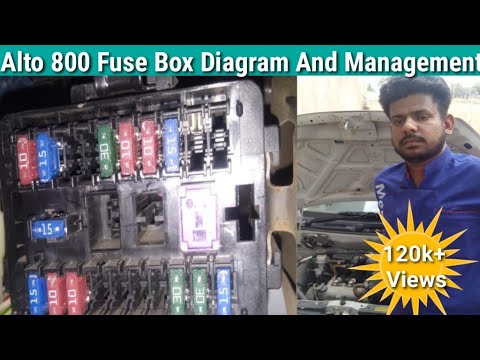
If you own a Maruti Alto 800 and don't know where the fuse box is located, don't worry because this guide provides all the necessary instructions to …
Maruti Alto 800
(2012-2023 /
AOD)
The Maruti Alto 800 has two fuse boxes: the first is located under the dashboard on the driver's side. Among the most common fuses here, you can find…
Other guides you may be interested in
|
How to Open the Bonnet on the Lancia Y
To open the bonnet on this vehicle, follow these simple instructions: first, open the driver's door and locate the lever positioned just below the dashboard, marked with an image of the vehicle with the bonnet open. Pull this lever towards you until you hear a "click" indicating the bonnet is released. Next, exit the cabin and stand in front of the bonnet to disengage the safety catch and complete the opening. To do this, slightly lift the bonnet, locate the yellow lever underneath, and pull it to the left to fully release and open the bonnet. by ScegliAuto More videos
|
|
For advertising on this site Write to info@scegliauto.com
ScegliAuto is not responsible for any inaccuracy of the data in the lists. To report any inaccuracy or your business (if you own the business in question), please write to info@scegliauto.com
Number of seconds to generate the page: 0.122
(c) ScegliAuto 2026 - info@scegliauto.com - Privacy policy VAT number: IT01247470535 |
