
|
Do it yourself
| |||
| ||||



Resetting the Tyre Pressure Warning Light on the Nissan Pulsar
Model: Nissan Pulsar
MK 1
- Years:
2014, 2015, 2016, 2017, 2018
Video tutorial
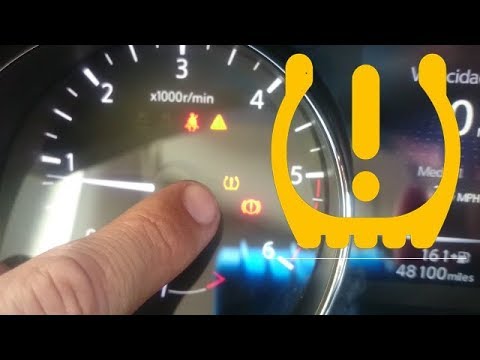
These simple steps will allow you to reset the tyre pressure warning light and recalibrate the TPMS sensors on the Nissan Pulsar. Before performing the reset, ensure all four tyres are at the correct operating pressures. Then, get into the vehicle and turn on the ignition. Navigate to the settings on the onboard computer until you reach the tyre pressure section, then initiate the calibration as shown in the video. At this point, wait for the TPMS warning light to reset on the instrument panel!
Updated on 4 November 2026 by ScegliAuto
Related tutorials
Nissan Pulsar
(2014-2018 /
MK 1)
Today, I will explain how to reset the service light on a 2017 Nissan Pulsar. Turn on the instrument cluster and press the menu button located on the…
Nissan Pulsar
(2014-2018 /
MK 1)
Today, you will see the instructions on how to reset the tyre pressure warning light on a Nissan Pulsar; before performing any operations, it is esse…

Nissan Pulsar
(2014-2018 /
MK 1)
It will be possible to completely reset the tire pressure warning light of the Nissan Pulsar by inflating the tires until they are brought back to th…
Other guides you may be interested in
|
How to Open the Fuel Filler Flap in the Hyundai i30?
In this tutorial, you will learn how to open the fuel filler flap in the Hyundai i30, a very simple operation that follows the typical procedure of most vehicles. First, unlock the locks using the designated button on the remote, then open the driver's door, locate the release lever on the left side of the seat, and operate it. Next, move to the fuel filler flap, open it completely, unscrew the cap, and refuel as needed. To close the flap, simply press it gently. by ScegliAuto More videos
|
|
For advertising on this site Write to info@scegliauto.com
ScegliAuto is not responsible for any inaccuracy of the data in the lists. To report any inaccuracy or your business (if you own the business in question), please write to info@scegliauto.com
Number of seconds to generate the page: 0.041
(c) ScegliAuto 2026 - info@scegliauto.com - Privacy policy VAT number: IT01247470535 |
