
|
Do it yourself
| |||
| ||||


Display of information on the Nissan Rogue's screen
Model: Nissan Rogue
T32
- Years 2014-2020
In this video we can see the information that appears on the instrument panel of the Nissan Rogue, on a display located between the speedometer and the tachometer, showing the vehicle settings, onboard computer information, driving system alerts, and information on the automatic speed control system and tire pressure information. The display can be modified using the button with the square icon located on the left side of the steering wheel and the enter button located just below, which can be moved up and down to navigate through the various options. The back arrow returns to the previous menu. A series of information is displayed on the screen, but some only if the car is equipped with it. The settings mode allows you to modify the information displayed on the screen, such as "driving assistance," "clock," "settings," "vehicle settings," "maintenance," "alarm," "units," "language," "restore factory settings." You can reset fuel economy by pressing the "menu" button for at least one second. At the bottom of the display, we will find all the information about distance traveled and fuel consumption, divided into two different trips called "A" and "B," and we can change this setting with the panel located on the left side of the steering wheel, on the dashboard.
Posted on 8 February 2025 by ScegliAuto
Video tutorial
Related tutorials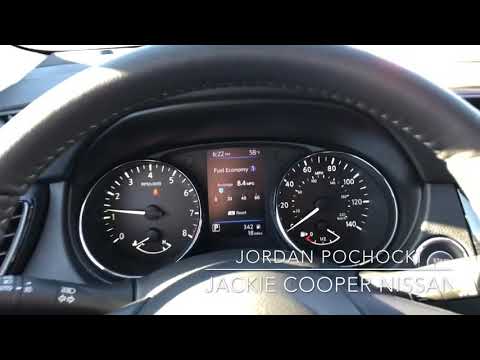
Nissan Rogue
(2014-2020 /
T32)
To reset the Service light on a Nissan Rogue, insert the key and turn it to the On position to activate the instrument cluster. Then, press the MENU …

Nissan Rogue
(2014-2020 /
T32)
To reset the Service light on a Nissan Rogue, turn the key to the on position to activate the instrument cluster. Then, press the button with the rig…

Nissan Rogue
(2021-2026 /
T33)
If you want to manually reset the engine oil light of your Nissan Rogue (2023), you must follow all the steps described in our new guide. First, star…
Other guides you may be interested in
|
How to Replace the External Wing Mirror on a Ford C MAX
In the event of a breakage, it will be necessary to replace the external wing mirror on the 2011 Ford C MAX. This operation is easily performed independently. Start by removing the internal cover of the mirror with a plastic lever. Then, use a socket wrench to remove the securing pins. Once the pins are removed, you can take off the mirror, but not before disconnecting the power connectors. Then proceed to fit the new mirror. First, connect the connectors and then secure the mirror to its housing with the pins. Refit the plastic cover and test the operation of the electric mirror using the controls. by ScegliAuto More videos
|
|
For advertising on this site Write to info@scegliauto.com
ScegliAuto is not responsible for any inaccuracy of the data in the lists. To report any inaccuracy or your business (if you own the business in question), please write to info@scegliauto.com
Number of seconds to generate the page: 0.275
(c) ScegliAuto 2026 - info@scegliauto.com - Privacy policy VAT number: IT01247470535 |
