
|
Do it yourself
| |||
| ||||



How to Reset the Service Light on the Opel Cascada
Model: Vauxhall Cascada
MK 1
- Years:
2013, 2014, 2015, 2016, 2017, 2018, 2019
Video tutorial
In this guide for all Opel Cascada owners, discover step by step how to correctly perform the manual reset of the service light that continues to illuminate even after the regular service. First, insert the key and turn on the ignition. Next, press the "Menu" button located on the left stalk of the steering wheel and use the small knob to navigate through the onboard menu. Once you find the option related to the oil life, press and hold the "Set/Clear" button and release it as soon as the reset of the light is successfully completed.
Updated on 30 July 2026 by ScegliAuto
Related tutorials
Vauxhall Cascada
(2013-2019 /
MK 1)
If you don't know where the OBD port of your 2013 Opel Cascada is located, don't worry because in the following guide you will find a description of …
Vauxhall Cascada
(2013-2019 /
MK 1)
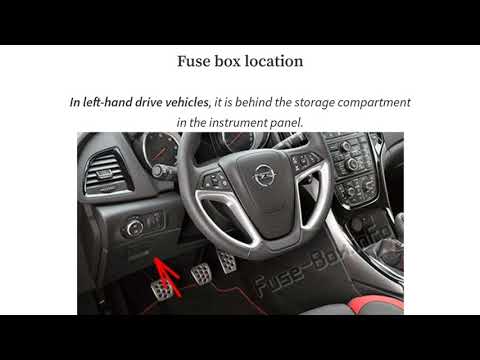
If you need to work on one or more electrical components of your Opel Cascada but do not know where the fuse box is, do not worry as you will find al…

Vauxhall Cascada
(2013-2019 /
MK 1)
It will be possible to remove the door panel of the Opel Cascada by using a tool to pry off the trim located above the armrest. Once this cover has b…
Other guides you may be interested in
|
How to Reset the Tyre Pressure Warning Light on the Jeep Renegade?
To reset the tyre pressure warning light on the Jeep Renegade, inflate the tyres until they reach the recommended pressure: this value is indicated on the sticker attached to the driver’s door pillar. Once the tyres are properly inflated, navigate through the menu that appears on the instrument cluster until you find the tyre pressure option. At this point, press and hold the OK button on the right side of the steering wheel to make the warning light disappear. by ScegliAuto More videos
|
|
For advertising on this site Write to info@scegliauto.com
ScegliAuto is not responsible for any inaccuracy of the data in the lists. To report any inaccuracy or your business (if you own the business in question), please write to info@scegliauto.com
Number of seconds to generate the page: 0.089
(c) ScegliAuto 2026 - info@scegliauto.com - Privacy policy VAT number: IT01247470535 |
