
|
Do it yourself
| |||
| ||||


In the Peugeot 208 2015, how do you adjust the time?
Model: Peugeot 208
A9, MK 1
- Years 2012-2019
The guide below explains how to set the clock on the on-board computer of the 2015 Peugeot 208, the car visible in the video. It's nothing complicated and easier than you might think. In fact, you just need to: Turn on the instrument panel, press and hold the button to the right of the on-board computer to access the aforementioned settings, and wait for the clock to flash. Now you can continue with the left button to set the hours and minutes, saving everything using the right button again.
Posted on 31 May 2025 by ScegliAuto
Video tutorial
Related tutorials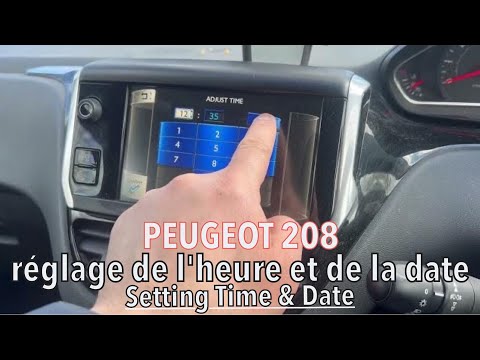
Peugeot 208
(2012-2019 /
A9, MK 1)
In this brief guide, you will learn how to set a new time on a first-generation Peugeot 208. This operation is very simple to perform. First, turn on…

Peugeot 208
(2019-2026 /
UB, UJ, UP, MK 2, UW)
The vehicle on which the clock adjustment was made in the tutorial video above is the latest version of the Peugeot 208, which means managing everyth…

Peugeot 208
(2012-2019 /
A9, MK 1)
In this tutorial, we will see how to set the time on a Peugeot 208, a very simple and quick operation to perform, for example, after disconnecting th…
Other guides you may be interested in
|
Frequently Asked QuestionsHow to reset the tyre pressure warning light on the Dacia Sandero?
To reset the tyre pressure warning light on the Dacia Sandero, inflate all the tyres to the pressure indicated on the label on the driver's door. Once the tyres are inflated, turn on the ignition and navigate through the menu using the controls on the right side of the steering wheel. Scroll with the arrows to find the tyre pressure option: by holding down the OK button located on the right side of the steering wheel, you can reset the warning light. by ScegliAuto More videos
|
|
For advertising on this site Write to info@scegliauto.com
ScegliAuto is not responsible for any inaccuracy of the data in the lists. To report any inaccuracy or your business (if you own the business in question), please write to info@scegliauto.com
Number of seconds to generate the page: 0.089
(c) ScegliAuto 2026 - info@scegliauto.com - Privacy policy VAT number: IT01247470535 |
