
|
Do it yourself
| |||
| ||||



How to Disable the Hill Holder on a Renault Clio IV
Model: Renault Clio
Clio IV, Clio 4, MK 4
- Years:
2012, 2013, 2014, 2015, 2016, 2017, 2018, 2019
Video tutorial
In this video, see how to permanently disable the Hill Holder on a Clio IV (so it doesn't activate every time you get in the car): locate the EOBD socket, insert your OBD11 and put in the key without starting the engine; connect the "V-Link" to Wi-Fi and open DDT4 All, accepting the various options: select your vehicle and then search the ECU configuration for the function described as HSA, and from the dropdown menu, choose the option "not implemented". At this point, you can close everything. The Hill Holder system will be permanently disabled, and to start on a hill, you will need to pull the handbrake again (happy days!).
Updated on 27 October 2026 by ScegliAuto
Related tutorials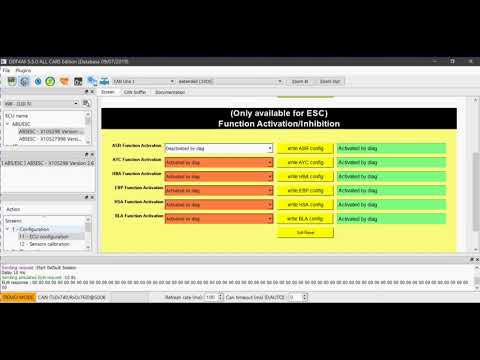
Renault Clio
(2012-2019 /
Clio IV, Clio 4, MK 4)
To disable the traction control on the Renault Clio, connect the diagnostic tool to the OBD port of the vehicle, located below the steering column. O…

Renault Clio
(2012-2019 /
Clio IV, Clio 4, MK 4)
To disable the traction control on the Renault Clio, connect a diagnostic tool to the vehicle's OBD port. Once connected, select the specific car mod…

Renault Clio
(2019-2026 /
Clio V, Clio 5)
Today, let's discover the steps that will allow us to activate and deactivate the speed limiter on the Renault Clio by following the instructions bel…
Other guides you may be interested in
|
How to reset the tyre pressure warning light on the Kia Niro EV?
To reset the tyre pressure warning light on the Kia Niro EV, inflate the tyres until they reach the correct pressure value. This value is indicated on the sticker attached to the driver's door pillar. Once the tyres are inflated, turn on the instrument cluster to check that the warning light has completely disappeared from the display. If it is still present, you may need to drive for a few miles to ensure it disappears completely from the screen. by ScegliAuto More videos
|
|
For advertising on this site Write to info@scegliauto.com
ScegliAuto is not responsible for any inaccuracy of the data in the lists. To report any inaccuracy or your business (if you own the business in question), please write to info@scegliauto.com
Number of seconds to generate the page: 0.099
(c) ScegliAuto 2026 - info@scegliauto.com - Privacy policy VAT number: IT01247470535 |
