
|
Do it yourself
| |||
| ||||


How to reset the maintenance lights on a Subaru Outback?
Model: Subaru Outback
BS, MK 5
- Years 2014-2019
Each maintenance light (oil change, tyre rotation, etc.) on the Subaru Outback can be reset through the radio display using the touchscreen. First, press the "info" button located on the left side of the display, then click on the "maintenance" icon with the spanner to access all settings. From here, you can choose which maintenance light to reset among those present. Of course, before performing the reset, ensure that the necessary services have been completed and do not reset the light without having actually carried them out.
Updated on 7 June 2026 by ScegliAuto
Video tutorial
Related tutorials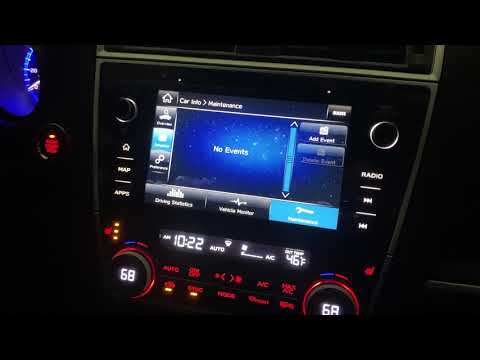
Subaru Outback
(2014-2019 /
BS, MK 5)
In the Subaru Outback, after changing the oil and filter, you need to manually remove the relevant warning light and reset the maintenance interval. …

Subaru Outback
(2009-2014 /
MK 4, BM, BR)
Before you begin, exit the cabin of your Subaru Outback. Start by checking and inflating the car's tyres until they all reach the correct pressure. N…

Subaru Outback
(2003-2009 /
BL, BP, MK 3)
Today we will see how to reset the trip meter (or trip A, B) on the Subaru Outback. First, get inside the vehicle and turn on the instrument panel; t…
Other guides you may be interested in
|
How to Adjust the Brightness of the Instrument Cluster on a Peugeot 3008?
To adjust the brightness of the instrument cluster on a Peugeot 3008, you need to turn on the ignition and access the settings via the menu located in the central area of the dashboard. In the screen that appears, select the "Display Configuration" option: now, by selecting the "Brightness" option, you can adjust it using the dedicated slider that will appear on the screen. The adjustment should be made with the headlights on as well as with them off. Once the adjustment is complete, you can turn off the instrument cluster. by ScegliAuto More videos
|
|
For advertising on this site Write to info@scegliauto.com
ScegliAuto is not responsible for any inaccuracy of the data in the lists. To report any inaccuracy or your business (if you own the business in question), please write to info@scegliauto.com
Number of seconds to generate the page: 0.420
(c) ScegliAuto 2026 - info@scegliauto.com - Privacy policy VAT number: IT01247470535 |
