
|
Do it yourself
| |||
| ||||


How to deactivate the rear seat control warning on a Toyota
Model: Toyota Toyota Various
In this video, we will see how to deactivate the "rear seat check" alert that should notify us if we have left someone in the back seat, but actually also alerts us if we have left a sweater or a bag. If we do not have young children to worry about, and we want to deactivate this feature - only in this case - we can do so with the instrument panel on, go to the menu, scroll down to "settings", press "Ok" twice in a row: this will make "off" appear. Go back to the initial screen, and it's done.
Posted on 12 June 2025 by ScegliAuto
Video tutorial
Related tutorials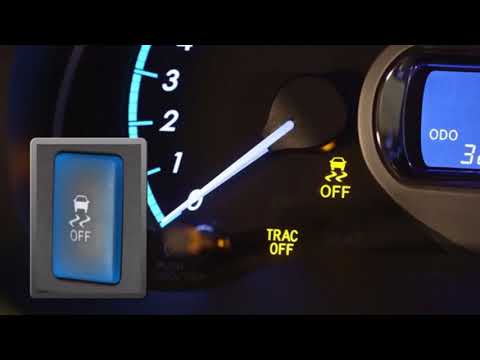
Toyota Toyota Various
This guide shows how to activate or deactivate the traction control (TRC or ESP) on Toyota cars. This system activates every time the vehicle is star…

Toyota Toyota Various
Today we will explain how to enable and disable the traction control indicator on a 2015 Toyota Prado. To enable traction control, we must turn on th…

Toyota Toyota Various
To disable the traction control on Toyotas, turn on the ignition by inserting the key into the ignition switch: once the dashboard is powered, locate…
Other guides you may be interested in
|
How to Open the Bonnet on the Lancia Y
To open the bonnet on this vehicle, follow these simple instructions: first, open the driver's door and locate the lever positioned just below the dashboard, marked with an image of the vehicle with the bonnet open. Pull this lever towards you until you hear a "click" indicating the bonnet is released. Next, exit the cabin and stand in front of the bonnet to disengage the safety catch and complete the opening. To do this, slightly lift the bonnet, locate the yellow lever underneath, and pull it to the left to fully release and open the bonnet. by ScegliAuto More videos
|
|
For advertising on this site Write to info@scegliauto.com
ScegliAuto is not responsible for any inaccuracy of the data in the lists. To report any inaccuracy or your business (if you own the business in question), please write to info@scegliauto.com
Number of seconds to generate the page: 0.593
(c) ScegliAuto 2026 - info@scegliauto.com - Privacy policy VAT number: IT01247470535 |
