
|
Do it yourself
| |||
| ||||


How to Replace the Battery of the Toyota Prius Hybrid?
Model: Toyota Prius
Xw30, MK 2
- Years 2009-2015
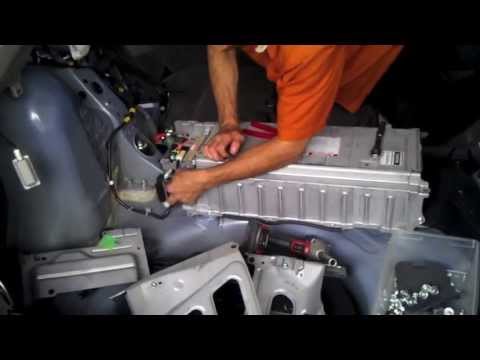
To replace the battery of the Toyota Prius Hybrid, lower the rear seats completely. Next, open the tailgate to access the boot and remove the carpet that serves as flooring. The battery is located underneath, on the right side near the rear seats. Once the battery is located, disconnect its terminals and loosen the bolts securing it to its housing. After removal, you can insert a new battery.
Updated on 3 May 2026 by ScegliAuto
Video tutorial
Related tutorials
Toyota Prius
(2004-2009 /
MK 1)
To replace the battery of the Toyota Prius Hybrid, remove the rivets securing the carpet on the boot floor. Once the carpet is removed, you will have…

Toyota Prius
(2009-2015 /
Xw30, MK 2)
In order to replace the battery pack of the Toyota Prius Hybrid, you need to open the rear hatch so that you can completely detach the lining at the …
Toyota Prius
(2004-2009 /
MK 1)
To remove the battery from the Toyota Prius Hybrid, open the tailgate and lift the carpet that serves as flooring inside the boot. Once the carpet is…
Other guides you may be interested in
|
Fuses Location and Diagram for the Volkswagen Crafter
In this guide, we will look at the location of the fuse boxes and how to find their diagram for the Volkswagen Crafter. First, get inside the vehicle and start by removing the plastic cover found under the steering wheel, to access the internal fuse box; you will find another fuse box in the engine compartment by removing the plastic cover located next to the battery. At this point, use the owner's manual to find the fuse diagram, which will allow you to identify and replace any blown fuses with new ones! by ScegliAuto More videos
|

|
For advertising on this site Write to info@scegliauto.com
ScegliAuto is not responsible for any inaccuracy of the data in the lists. To report any inaccuracy or your business (if you own the business in question), please write to info@scegliauto.com
Number of seconds to generate the page: 0.446
(c) ScegliAuto 2026 - info@scegliauto.com - Privacy policy VAT number: IT01247470535 |
