
|
Do it yourself
| |||
| ||||


Installing an Aux Input Adapter
Model: Toyota Rav 4
MK 2, Xa20
- Years:
2000, 2001, 2002, 2003, 2004, 2005, 2006
Video tutorial
To install an auxiliary input adapter on the original radio, you need to remove the radio itself. Start by unfastening the plastic covers on the sides of the centre console; then unscrew the mounting screws for the air vents, which will come off along with the radio's trim. At this point, unscrew the radio's mounting bolts and pull it out of its housing; then connect the adapter plug into the appropriate socket and check its functionality. Finally, position the wiring to place the auxiliary output, for example, in the ashtray compartment.
Updated on 10 February 2026 by ScegliAuto
Related tutorials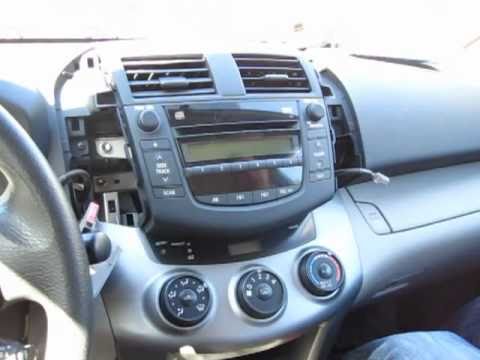
Toyota Rav 4
(2006-2013 /
Xa30, MK 3)
To carry out this operation, you need to have good manual skills and a fair amount of experience. First, remove the car radio. On the front panel of …

Toyota Rav 4
(2019-2026 /
MK 5, Xa50)
The following steps will show you how to install the door sills on a Toyota RAV4, following the instructions below. First, open the car doors and tho…

Toyota Rav 4
(2019-2026 /
MK 5, Xa50)
Enhancing the interior of your car with an ambient light kit will make it look much more modern and appealing. You can purchase specific aftermarket …
Other guides you may be interested in |
Where to Find and How to Remove the Spare Wheel of a Peugeot 5008?
The spare wheel of a Peugeot 5008 is located under the rear of the vehicle. To remove it, you need to lift the third row of seats to access the fixing bolt that holds the spare wheel in position. Using the correct spanner, proceed to unscrew the fixing bolt until the wheel is no longer secured. At this point, you can extract the spare wheel from underneath the vehicle. Once you have completed this step, you are free to fit the spare wheel. Ensure you correctly remount the spare wheel and securely tighten the fixing bolt when you are finished. by ScegliAuto More videos
|
|
For advertising on this site Write to info@scegliauto.com
ScegliAuto is not responsible for any inaccuracy of the data in the lists. To report any inaccuracy or your business (if you own the business in question), please write to info@scegliauto.com
Number of seconds to generate the page: 0.031
(c) ScegliAuto 2026 - info@scegliauto.com - Privacy policy VAT number: IT01247470535 |
