
|
Do it yourself
| |||
| ||||


How to Unlock App Connect on the Volkswagen Tiguan?
Model: Volkswagen Tiguan
BW, MK 2, AD
- Years 2016-2025
The App Connect feature on the Volkswagen Tiguan can be unlocked by visiting the official network or the dealership where the vehicle was purchased: here, you can purchase a package that allows you to unlock this functionality. Once the package has been purchased, you can enter the unlock key to use all its features: you will be able to use voice commands to play multimedia content, answer calls, use maps directly on the display, and more.
Updated on 17 September 2026 by ScegliAuto
Video tutorial
Related tutorials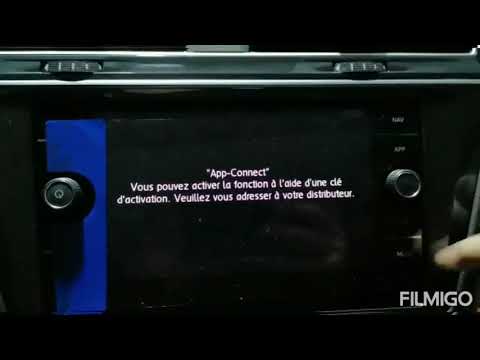
Volkswagen Tiguan
(2016-2025 /
BW, MK 2, AD)
To unlock App Connect on the Volkswagen Tiguan, you need to visit the official network or the dealership where the car was purchased: here, you can p…

Volkswagen Tiguan
(2016-2025 /
BW, MK 2, AD)
The procedure to unlock App Connect on the Volkswagen Tiguan cannot be carried out independently: in order to access these functionalities, it will b…

Volkswagen Tiguan
(2016-2025 /
BW, MK 2, AD)
Briefly, here are the instructions to activate the App Connect system by connecting your smartphone to the multimedia system of the Volkswagen Tiguan…
Other guides you may be interested in
|
Frequently Asked QuestionsHow to Replace the Cabin Filter on the Opel Grandland X
If you own an Opel Grandland X and want to know the steps to replace the cabin air filter, carefully read the following guide and follow the described steps. First, enter the vehicle and go to the passenger side. Then, locate the box containing the air filter in the lower side area of the dashboard. Remove the cover of the box and finally replace the old filter with the new one. Refit the cover, and you are done. by ScegliAuto More videos
|
|
For advertising on this site Write to info@scegliauto.com
ScegliAuto is not responsible for any inaccuracy of the data in the lists. To report any inaccuracy or your business (if you own the business in question), please write to info@scegliauto.com
Number of seconds to generate the page: 0.128
(c) ScegliAuto 2026 - info@scegliauto.com - Privacy policy VAT number: IT01247470535 |
