
|
Do it yourself
| |||
| ||||


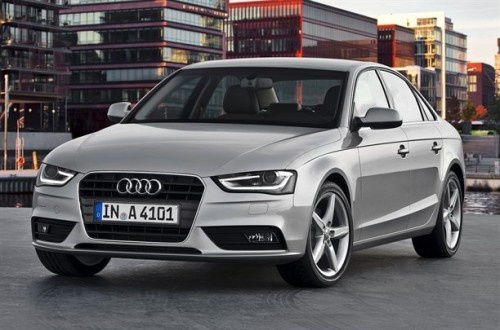
How to apply the black logo on an Audi A4 B8.
Model: Audi A4
B8
- Years 2007-2016
Let's see in this video how to make a low-budget modification that has a big impact on the aesthetics of the car. In fact, simply changing the "Audi" logo from chrome to black on the front of an A4 B8 can give it a much more aggressive and modern look. We can find the kit for the two glossy black emblems, both front and rear, for example on eBay with the code 405847674939 for the price of 17.90 euros, with free shipping. With the help of a metal spatula, we can remove the chrome logo, clean the base, and then fit the new glossy black one in its place, and enjoy the result.
Posted on 12 December 2025 by ScegliAuto
Video tutorial
Related tutorials
Audi A4
(2007-2016 /
B8)
Inserting an additional logo on the steering wheel of an Audi vehicle is an extremely simple operation. Today, with the help of this short video tuto…

Audi A4
(2007-2016 /
B8)
Regarding the connection of the rear camera on an Audi A4 B8, an entire video is dedicated to a particularly delicate part, which is the connection o…

Audi A4
(2014-2024 /
B9)
How to replace the dead battery in an Audi A4 remote? Follow these steps: Take your remote and detach the metal part on the side. Next, press the two…
Other guides you may be interested in |
How to Bleed the Clutch on a Renault Clio?
To bleed the clutch on a Renault Clio, open the bonnet to access the components located in the engine bay: here, you will need to undo the screws that secure the battery in its housing, the intake manifold, and the coolant reservoir. This will allow you to locate the pipe through which the brake fluid flows: by inserting the other end of the pipe into a container, you can press the clutch pedal to expel all the fluid until it fills the container. by ScegliAuto More videos
|
|
For advertising on this site Write to info@scegliauto.com
ScegliAuto is not responsible for any inaccuracy of the data in the lists. To report any inaccuracy or your business (if you own the business in question), please write to info@scegliauto.com
Number of seconds to generate the page: 0.307
(c) ScegliAuto 2026 - info@scegliauto.com - Privacy policy VAT number: IT01247470535 |
