
|
Do it yourself
| |||
| ||||


Removing Car Radio for Repair
Model: BMW Serie 3
E46
- Years 1998-2006
Remove the plastic trim from the side moldings, then unscrew the retaining screws of the radio to allow for extraction. Disconnect the various connectors and remove the car radio. Remove the old wiring harness and install the wiring provided with the new radio, paying attention to the references. Connect the adapter to the antenna cable with the new connector. Reconnect the cables to the radio by plugging in the respective connectors and insert the radio into its slot, being careful not to pinch the cables until it is secured. Screw in the fastening screws. Turn on the radio to check functionality.
Updated on 8 February 2026 by ScegliAuto
Video tutorial
Related tutorials
BMW Serie 3
(2005-2013 /
E91, E90, E92)
The instructions provided in this guide will allow us to remove and replace the stock radio of the BMW 3 Series. First, we get inside the vehicle and…

BMW Serie 3
(1998-2006 /
E46)
Today's step-by-step instructions will show us how to disassemble and replace the stock radio of the BMW 3 Series. First, we get into the car and sta…
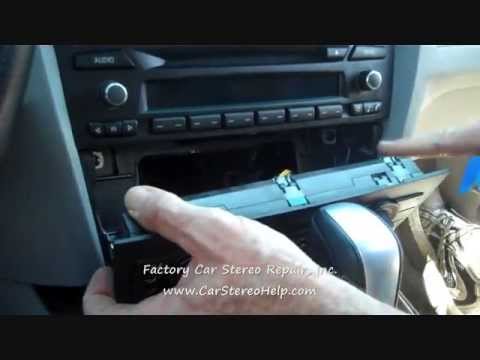
BMW Serie 3
(1998-2006 /
E46)
To remove the original factory car radio, first, you need to take off the climate control knobs. Using a plastic lever or a small flathead screwdrive…
Other guides you may be interested in
|
How to Adjust the Brightness of the Instrument Cluster on a Peugeot 3008?
To adjust the brightness of the instrument cluster on a Peugeot 3008, you need to turn on the ignition and access the settings via the menu located in the central area of the dashboard. In the screen that appears, select the "Display Configuration" option: now, by selecting the "Brightness" option, you can adjust it using the dedicated slider that will appear on the screen. The adjustment should be made with the headlights on as well as with them off. Once the adjustment is complete, you can turn off the instrument cluster. by ScegliAuto More videos
|
|
For advertising on this site Write to info@scegliauto.com
ScegliAuto is not responsible for any inaccuracy of the data in the lists. To report any inaccuracy or your business (if you own the business in question), please write to info@scegliauto.com
Number of seconds to generate the page: 0.080
(c) ScegliAuto 2026 - info@scegliauto.com - Privacy policy VAT number: IT01247470535 |
