
|
Do it yourself
| |||
| ||||


Ford Ford Various - Crankshaft position sensorCrankshaft Position Sensor Ford Ford Various ( / ) Ford Ford Various
 Removing Engine RPM Sensor from Ford In this video, you will see the main steps to remove the engine RPM sensor from certain Ford models. First, open the bonnet and disconnect the electrical …Read all… Posted on 28 April 2026 by ScegliAuto Airbag (6) Car stereo (15) Battery (3) Transmission (8) Body (4) Control unit (1) Key (36) Timing belt (6) Onboard computer (7) Checks and maintenance (13) MAF sensor (2) Headlight (1) Air filter (3) Cabin air filter (2) Clutch (1) Light bulb (1) Headlight bulb (1) Engine oil (1) Clock (2) Door trim panel (2) Tires (1) Car door (1) Power window switch (1) Instrument cluster (5) Wheel (1) Fuse box (15) Seat (2) Crankshaft position sensor (1) Side mirror (2) Rearview mirror (3) AdBlue warning light (2) Warning light – error code (49) (3) Tire pressure warning light (3) Service warning light (7) Manufacturer emblem (2) Fuel cap (1) Drivetrain (2) EGR valve (1) Steering wheel (2) |
How to Replace the Remote Battery of the Ford Puma?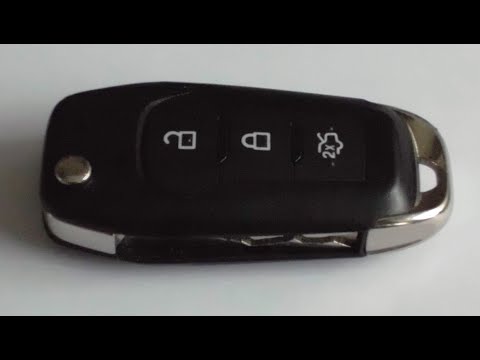
As shown in this tutorial, replacing the remote battery of the Ford Puma is an extremely simple and quick operation. To do this, you will need a small flat-head screwdriver and a replacement CR2032 battery. First, extend the emergency metal key using the designated button, then locate the indicated slot, lever it open with the screwdriver, and separate the rear cover. Once done, remove the old battery, insert the replacement while respecting the polarity, and reassemble everything. by ScegliAuto More videos
|
|
For advertising on this site Write to info@scegliauto.com
ScegliAuto is not responsible for any inaccuracy of the data in the lists. To report any inaccuracy or your business (if you own the business in question), please write to info@scegliauto.com
Number of seconds to generate the page: 0.113
(c) ScegliAuto 2026 - info@scegliauto.com - Privacy policy VAT number: IT01247470535 |
