
|
Do it yourself
| |||
| ||||


Ford Ford Various - Timing beltTiming Belt Ford Ford Various ( / ) Ford Ford Various How to replace the timing belt on Ford vehicles. Today we will explain how to independently replace the timing belt on Ford Ecoboost vehicles. To replace the belt, we need to remove the pulley so we can slide …Read all… Posted on 28 January 2026 by ScegliAuto  Ford Ford Various How do you replace the timing belt of Ford with 1.0 EcoBoost engine? In order to replace the timing belt of Ford vehicles with a 1.0 EcoBoost engine, you need to open the hood to access the components inside the engine …Read all… Posted on 22 April 2025 by ScegliAuto  Ford Ford Various The Ford Ecoboost engine from 2018 onwards has an oil bath timing chain. This youtuber admits his own ignorance with relief, and lets us know a very important thing: the Ford Ecoboost 1.0 3-cylinder engines, built from 2018 onwards, …Read all… Posted on 29 March 2025 by ScegliAuto  Ford Ford Various Ford Ecoboost Engine Codes for Models with Oil Bath Belt and Those with Chain This video explains the engine codes within the same Ford model that distinguish oil bath belt distributions from chain ones. We will also discover where to …Read all… Posted on 2 November 2026 by ScegliAuto  Ford Ford Various How to Change the Timing Belt on the Ford 2.0 With the help of this video tutorial, you will learn how to remove the timing belt from the Ford 2.0. First, open the bonnet and remove all the covering …Read all… Posted on 1 September 2026 by ScegliAuto  Ford Ford Various How to Replace the Timing Belt on a Ford 1.0 EcoBoost Engine? To replace the timing belt on a Ford 1.0 EcoBoost engine, loosen the screws securing the side protection panel of the engine, along with those securing the …Read all… Posted on 21 August 2026 by ScegliAuto Airbag (6) Car stereo (15) Battery (3) Transmission (8) Body (4) Control unit (1) Key (36) Timing belt (6) Onboard computer (7) Checks and maintenance (13) MAF sensor (2) Headlight (1) Air filter (3) Cabin air filter (2) Clutch (1) Light bulb (1) Headlight bulb (1) Engine oil (1) Clock (2) Door trim panel (2) Tires (1) Car door (1) Power window switch (1) Instrument cluster (5) Wheel (1) Fuse box (15) Seat (2) Crankshaft position sensor (1) Side mirror (2) Rearview mirror (3) AdBlue warning light (2) Warning light – error code (49) Tire pressure warning light (6) Service warning light (7) Manufacturer emblem (2) Fuel cap (1) Drivetrain (2) EGR valve (1) Steering wheel (2) |
How to Reset the AdBlue Warning Light on a Dacia Duster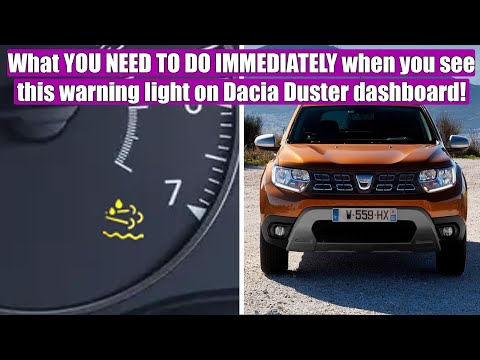
In this video tutorial, you will see how to reset the AdBlue warning light on a Dacia Duster by following a few simple steps. Usually, the AdBlue light appears alongside two other lights: the engine check light and the service light. This light comes on before the AdBlue tank is empty. When the yellow light comes on, refill with additive (when the yellow light is on, there are still two or three litres in the tank, allowing you to drive another 1,500 miles). After refilling the tank with AdBlue, the light should turn off automatically. If you wait too long, the light turns red, and you will be unable to start the engine after stopping the car, preventing you from driving. If the light does not turn off after refilling, you will need to visit a Dacia dealer for an AdBlue software update. by ScegliAuto More videos
|
|
For advertising on this site Write to info@scegliauto.com
ScegliAuto is not responsible for any inaccuracy of the data in the lists. To report any inaccuracy or your business (if you own the business in question), please write to info@scegliauto.com
Number of seconds to generate the page: 0.005
(c) ScegliAuto 2026 - info@scegliauto.com - Privacy policy - About us VAT number: IT01247470535 |
